How Websites Decide You're Human
How Websites Decide You're Human
How Websites Decide You're Human
/
/
San Francisco
San Francisco
/
/

Jagadesh P
Jagadesh P

Automated bots account for nearly half of all web traffic. According to Akamai's 2024 State of the Internet report, bots make up about 42% of traffic—and nearly two-thirds of those are malicious. They scrape protected data, stuff credentials, hijack accounts, and exploit competitive advantages.
This article explains how anti-bot protection works under the hood: the signals collected, the layers involved, and the logic that separates humans from sophisticated automation. Understanding the machinery helps you evaluate solutions, debug issues, and appreciate what it takes to defend modern applications.
Understanding the Bot Threat Landscape
Three Categories of Bot Traffic
Modern websites see three types of automated traffic.
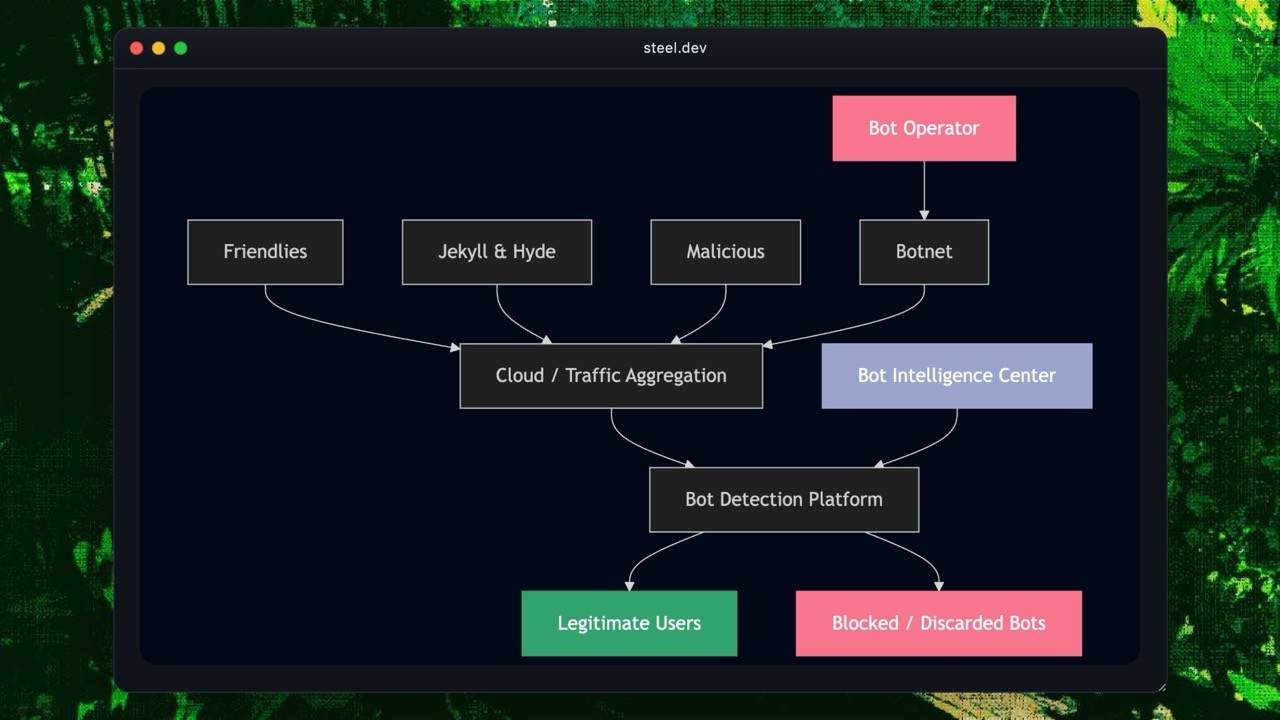
Friendly Bots
Search engine crawlers, uptime monitors, feed aggregators, and copyright verification tools. They follow robots.txt, identify themselves, and behave predictably. Let them through.
Jekyll and Hyde Bots
Price comparison scrapers, social media automation tools, ticketing bots. Sometimes useful, sometimes abusive—depends on frequency, context, and business impact.
Malicious Bots
Credential stuffing, DDoS attacks, payment fraud, account takeover, inventory hoarding, spam. This is what anti-bot systems exist to stop.
Why Modern Anti-Bot Systems Need Multiple Layers
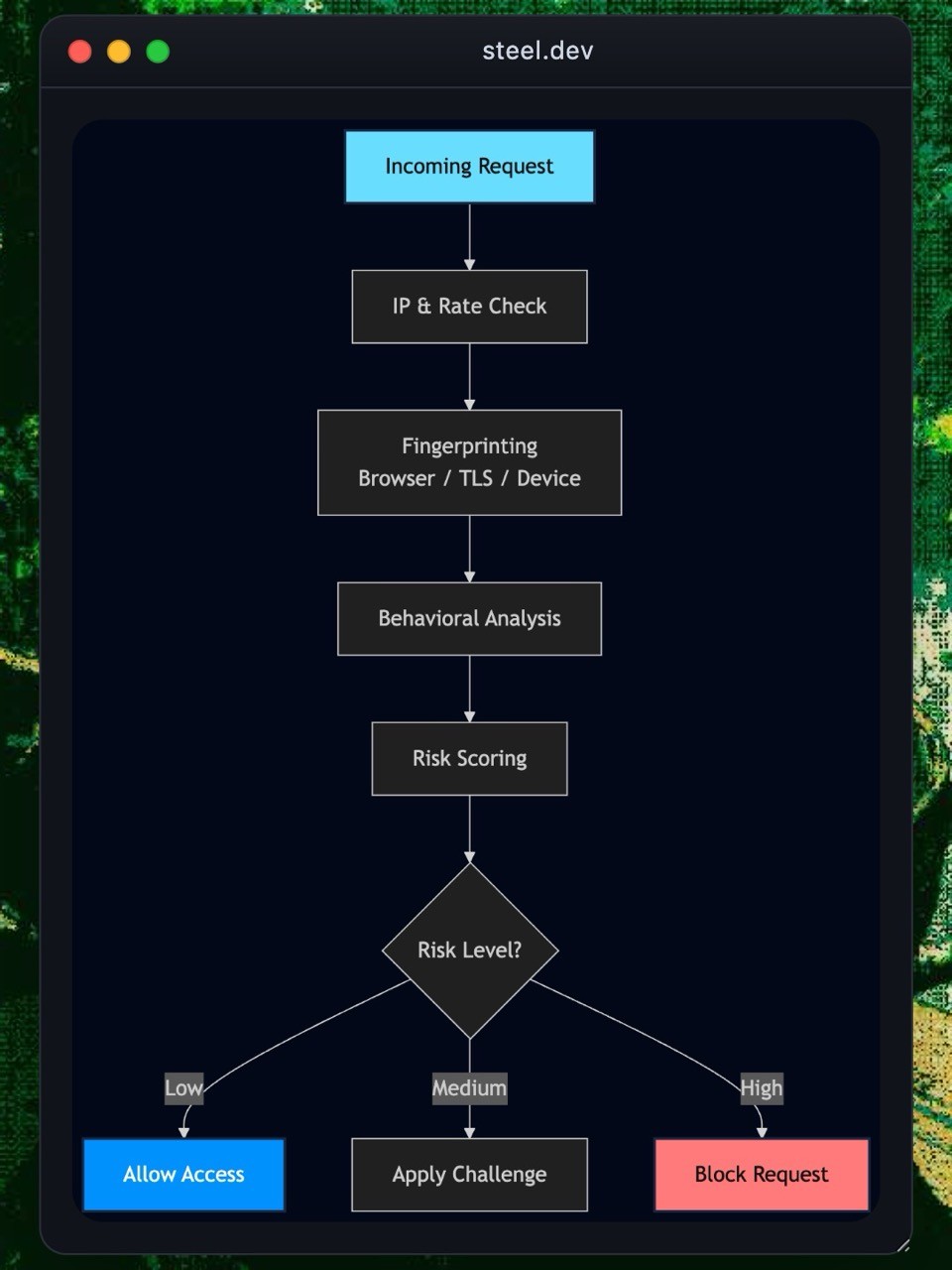
Bots range from simple scripts to full-blown headless browsers that mimic human behavior. No single detection method catches everything. Network-level checks stop basic automation but fail against residential proxies. Fingerprinting catches device anomalies but can be spoofed. Behavioral signals work well, but high-risk flows still need challenges.
Modern anti-bot systems layer these techniques so weaknesses in one area get covered by strengths in another. Websites evaluate risk dynamically and escalate friction only when something looks truly suspicious.
Layer 1: Network-Level Detection
IP Reputation Analysis
Anti-bot systems check incoming IPs against global threat intelligence sources to identify datacenter IPs, proxy services, VPN endpoints, Tor exit nodes, and known malicious addresses. IPs with poor reputation get flagged for additional verification like CAPTCHA challenges.
Rate Limiting
Rate controls detect abnormal request patterns and prevent abuse. Common techniques:
Fixed window — counters reset at fixed intervals, such as 100 requests per hour
Sliding window — distributes limits over rolling time intervals for smoother traffic management
Token bucket — allows short bursts while maintaining sustained rate constraints
When clients exceed limits, servers return HTTP 429 Too Many Requests. Advanced systems adapt limits based on authentication status, endpoint sensitivity, and past behavior.
Layer 2: Browser and Device Fingerprinting
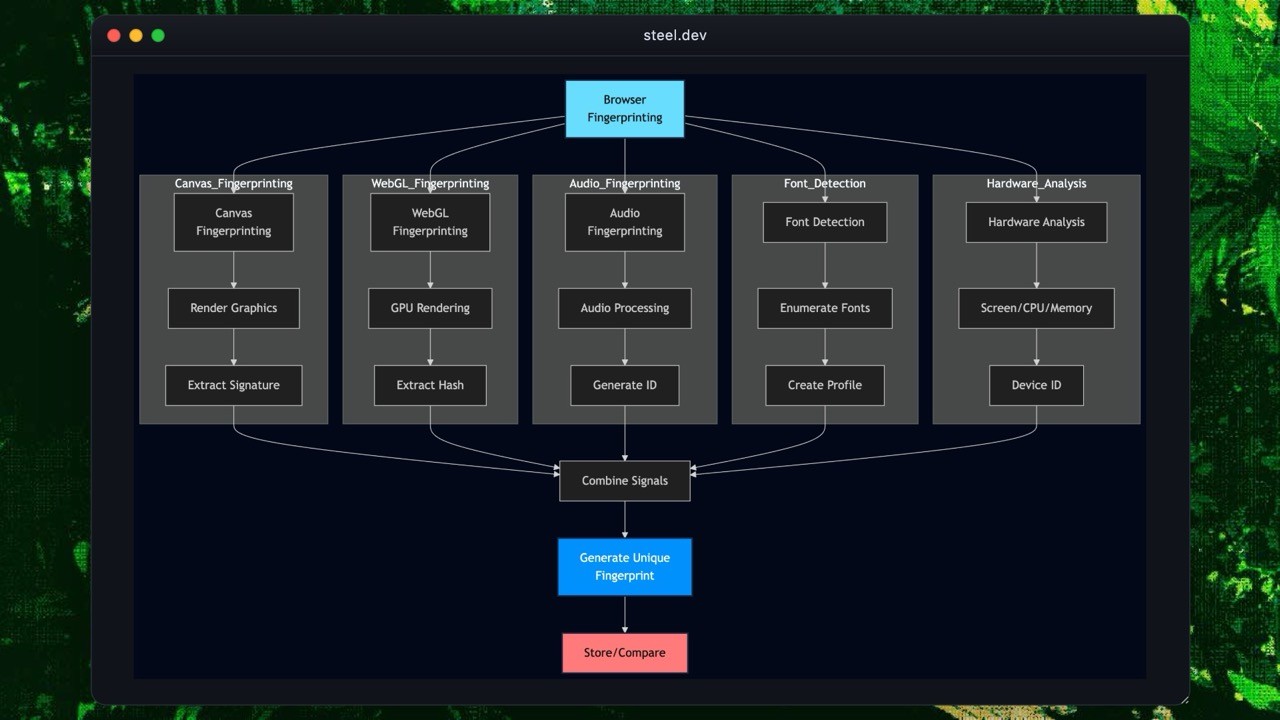
Browser and device fingerprinting generates stable identifiers by analyzing browser environment, operating system, and hardware characteristics. These identifiers don't rely on cookies, making them effective against bots that rotate identities, clear storage, or run in private mode.
Canvas Fingerprinting
Canvas fingerprinting uses the HTML5 canvas element to detect differences in GPU hardware, graphics drivers, and rendering engines. The system draws text or graphics on a hidden canvas and captures the pixel data. Small variations in hardware or driver configuration produce different pixel patterns, creating a unique fingerprint.
Conceptual example
// Canvas fingerprint generation (conceptual example)
const canvas = document.createElement('canvas');
const ctx = canvas.getContext('2d');

ctx.textBaseline = 'top';
ctx.font = '14px Arial';
ctx.fillText('Browser fingerprint test', 2, 2);

const dataURL = canvas.toDataURL();
const fingerprint = hash(dataURL);
// Canvas fingerprint generation (conceptual example)
const canvas = document.createElement('canvas');
const ctx = canvas.getContext('2d');

ctx.textBaseline = 'top';
ctx.font = '14px Arial';
ctx.fillText('Browser fingerprint test', 2, 2);

const dataURL = canvas.toDataURL();
const fingerprint = hash(dataURL);
WebGL Fingerprinting
WebGL fingerprinting uses the browser's 3D rendering pipeline. It collects GPU vendor, renderer strings, supported shader extensions, and rendering behavior. These parameters differ across devices and help identify automation tools using virtual GPUs.
Audio Context Fingerprinting
The Web Audio API generates audio signals and measures how the device processes them. The resulting waveform varies across devices due to hardware audio pipelines, drivers, and browser implementations. These differences form a stable signature that's difficult for bots to spoof.
Font Enumeration
Font fingerprinting checks the list of installed system fonts. Each operating system, enterprise device, or custom environment tends to have a unique font combination. These lists help differentiate between real users, automated browsers, and headless environments.
Hardware and Environment Profiling
Anti-bot systems gather device metadata to build a broader fingerprint. Common signals:
Screen size and pixel density
Available memory
CPU core count
Color depth
Battery status (on mobile)
Installed plugins, MIME types, or extensions
System locale and timezone
Bots often fail to replicate the full set of these attributes, and small inconsistencies can reveal automated behavior.
Layer 3: Behavioral Analysis
Behavioral analysis identifies patterns that deviate from natural human interaction.
Mouse Movement Analysis
Systems track cursor paths, acceleration, hesitations, and micro-adjustments. Humans move their mouse with natural curves and irregular pauses. Bots generate straight, overly precise, or uniform movements.
Keyboard Dynamics
Systems evaluate typing cadence, key-press duration, rhythm variability, and error behavior. Human typing includes inconsistencies and occasional mistakes. Automated input shows perfectly uniform timing.
Navigation Patterns
Systems observe page sequence, dwell time, scroll depth, speed, and interaction timing. Warning signs include instant form submissions, zero page dwell time, or clicking elements immediately after load.
Session Consistency
Systems check whether user attributes stay stable during a session. Abrupt changes in fingerprints, IP, geolocation, or device traits indicate account takeover or bot-driven manipulation.
Modern anti-bot systems apply machine learning models trained on massive datasets of real user interactions to identify statistical anomalies in real time.
Layer 4: Challenge Mechanisms
Challenge mechanisms act as the final barrier when a request appears risky. These controls require the client to prove a human or genuine browser environment operates it.
CAPTCHA Systems
CAPTCHAs remain the most well-known challenge method. Modern variants:
Image-based CAPTCHAs where users read distorted text or pick the correct characters
Object-recognition challenges that ask users to identify items like vehicles or signs
Invisible CAPTCHAs that silently assess risk and only show a challenge when necessary
CAPTCHAs add friction and impact accessibility. Use them sparingly, only when risk is high.
Adaptive Interactive Challenges
Some systems present lightweight interactive puzzles—dragging sliders, matching shapes, completing simple tasks. These adapt to the perceived risk level, making them harder for automated tools but easy for humans.
JavaScript Execution Challenges
These challenges verify the environment supports full JavaScript execution and browser APIs. Examples include:
Checking DOM manipulation behavior
Requiring accurate execution of cryptographic or timing-based operations
Creating dynamic elements that must be interpreted in a real browser
Bots running in incomplete or emulated environments fail these checks.
The Constant Evolution of Bots and Defenses
Anti-bot engineering is a continuous arms race. As detection methods improve, attackers adapt with better browser automation tools, real-device spoofing, residential proxy networks, human-assisted solving, and AI-driven interaction patterns.
Anti-bot systems must evolve continuously—updating signals, tuning thresholds, combining heuristics with learned models. Static defenses don't last long. Layered and adaptive ones do.
Conclusion
Modern anti-bot systems operate as a layered security pipeline—analyzing network signals, device characteristics, behavior patterns, and environmental clues to distinguish real users from sophisticated automation. No single technique stands alone. Effective defenses combine reputation data, fingerprinting, behavioral modeling, and adaptive challenges.
Understanding what happens behind the scenes demystifies why requests get flagged, why CAPTCHAs appear, and why bot mitigation is more complex than blocking IP ranges or checking user agents. Bots evolve quickly. Defending against them requires systems that evolve just as fast.
Automated bots account for nearly half of all web traffic. According to Akamai's 2024 State of the Internet report, bots make up about 42% of traffic—and nearly two-thirds of those are malicious. They scrape protected data, stuff credentials, hijack accounts, and exploit competitive advantages.
This article explains how anti-bot protection works under the hood: the signals collected, the layers involved, and the logic that separates humans from sophisticated automation. Understanding the machinery helps you evaluate solutions, debug issues, and appreciate what it takes to defend modern applications.
Understanding the Bot Threat Landscape
Three Categories of Bot Traffic
Modern websites see three types of automated traffic.
Friendly Bots
Search engine crawlers, uptime monitors, feed aggregators, and copyright verification tools. They follow robots.txt, identify themselves, and behave predictably. Let them through.
Jekyll and Hyde Bots
Price comparison scrapers, social media automation tools, ticketing bots. Sometimes useful, sometimes abusive—depends on frequency, context, and business impact.
Malicious Bots
Credential stuffing, DDoS attacks, payment fraud, account takeover, inventory hoarding, spam. This is what anti-bot systems exist to stop.
Why Modern Anti-Bot Systems Need Multiple Layers
Bots range from simple scripts to full-blown headless browsers that mimic human behavior. No single detection method catches everything. Network-level checks stop basic automation but fail against residential proxies. Fingerprinting catches device anomalies but can be spoofed. Behavioral signals work well, but high-risk flows still need challenges.
Modern anti-bot systems layer these techniques so weaknesses in one area get covered by strengths in another. Websites evaluate risk dynamically and escalate friction only when something looks truly suspicious.
Layer 1: Network-Level Detection
IP Reputation Analysis
Anti-bot systems check incoming IPs against global threat intelligence sources to identify datacenter IPs, proxy services, VPN endpoints, Tor exit nodes, and known malicious addresses. IPs with poor reputation get flagged for additional verification like CAPTCHA challenges.
Rate Limiting
Rate controls detect abnormal request patterns and prevent abuse. Common techniques:
Fixed window — counters reset at fixed intervals, such as 100 requests per hour
Sliding window — distributes limits over rolling time intervals for smoother traffic management
Token bucket — allows short bursts while maintaining sustained rate constraints
When clients exceed limits, servers return HTTP 429 Too Many Requests. Advanced systems adapt limits based on authentication status, endpoint sensitivity, and past behavior.
Layer 2: Browser and Device Fingerprinting
Browser and device fingerprinting generates stable identifiers by analyzing browser environment, operating system, and hardware characteristics. These identifiers don't rely on cookies, making them effective against bots that rotate identities, clear storage, or run in private mode.
Canvas Fingerprinting
Canvas fingerprinting uses the HTML5 canvas element to detect differences in GPU hardware, graphics drivers, and rendering engines. The system draws text or graphics on a hidden canvas and captures the pixel data. Small variations in hardware or driver configuration produce different pixel patterns, creating a unique fingerprint.
Conceptual example
// Canvas fingerprint generation (conceptual example)
const canvas = document.createElement('canvas');
const ctx = canvas.getContext('2d');

ctx.textBaseline = 'top';
ctx.font = '14px Arial';
ctx.fillText('Browser fingerprint test', 2, 2);

const dataURL = canvas.toDataURL();
const fingerprint = hash(dataURL);
WebGL Fingerprinting
WebGL fingerprinting uses the browser's 3D rendering pipeline. It collects GPU vendor, renderer strings, supported shader extensions, and rendering behavior. These parameters differ across devices and help identify automation tools using virtual GPUs.
Audio Context Fingerprinting
The Web Audio API generates audio signals and measures how the device processes them. The resulting waveform varies across devices due to hardware audio pipelines, drivers, and browser implementations. These differences form a stable signature that's difficult for bots to spoof.
Font Enumeration
Font fingerprinting checks the list of installed system fonts. Each operating system, enterprise device, or custom environment tends to have a unique font combination. These lists help differentiate between real users, automated browsers, and headless environments.
Hardware and Environment Profiling
Anti-bot systems gather device metadata to build a broader fingerprint. Common signals:
Screen size and pixel density
Available memory
CPU core count
Color depth
Battery status (on mobile)
Installed plugins, MIME types, or extensions
System locale and timezone
Bots often fail to replicate the full set of these attributes, and small inconsistencies can reveal automated behavior.
Layer 3: Behavioral Analysis
Behavioral analysis identifies patterns that deviate from natural human interaction.
Mouse Movement Analysis
Systems track cursor paths, acceleration, hesitations, and micro-adjustments. Humans move their mouse with natural curves and irregular pauses. Bots generate straight, overly precise, or uniform movements.
Keyboard Dynamics
Systems evaluate typing cadence, key-press duration, rhythm variability, and error behavior. Human typing includes inconsistencies and occasional mistakes. Automated input shows perfectly uniform timing.
Navigation Patterns
Systems observe page sequence, dwell time, scroll depth, speed, and interaction timing. Warning signs include instant form submissions, zero page dwell time, or clicking elements immediately after load.
Session Consistency
Systems check whether user attributes stay stable during a session. Abrupt changes in fingerprints, IP, geolocation, or device traits indicate account takeover or bot-driven manipulation.
Modern anti-bot systems apply machine learning models trained on massive datasets of real user interactions to identify statistical anomalies in real time.
Layer 4: Challenge Mechanisms
Challenge mechanisms act as the final barrier when a request appears risky. These controls require the client to prove a human or genuine browser environment operates it.
CAPTCHA Systems
CAPTCHAs remain the most well-known challenge method. Modern variants:
Image-based CAPTCHAs where users read distorted text or pick the correct characters
Object-recognition challenges that ask users to identify items like vehicles or signs
Invisible CAPTCHAs that silently assess risk and only show a challenge when necessary
CAPTCHAs add friction and impact accessibility. Use them sparingly, only when risk is high.
Adaptive Interactive Challenges
Some systems present lightweight interactive puzzles—dragging sliders, matching shapes, completing simple tasks. These adapt to the perceived risk level, making them harder for automated tools but easy for humans.
JavaScript Execution Challenges
These challenges verify the environment supports full JavaScript execution and browser APIs. Examples include:
Checking DOM manipulation behavior
Requiring accurate execution of cryptographic or timing-based operations
Creating dynamic elements that must be interpreted in a real browser
Bots running in incomplete or emulated environments fail these checks.
The Constant Evolution of Bots and Defenses
Anti-bot engineering is a continuous arms race. As detection methods improve, attackers adapt with better browser automation tools, real-device spoofing, residential proxy networks, human-assisted solving, and AI-driven interaction patterns.
Anti-bot systems must evolve continuously—updating signals, tuning thresholds, combining heuristics with learned models. Static defenses don't last long. Layered and adaptive ones do.
Conclusion
Modern anti-bot systems operate as a layered security pipeline—analyzing network signals, device characteristics, behavior patterns, and environmental clues to distinguish real users from sophisticated automation. No single technique stands alone. Effective defenses combine reputation data, fingerprinting, behavioral modeling, and adaptive challenges.
Understanding what happens behind the scenes demystifies why requests get flagged, why CAPTCHAs appear, and why bot mitigation is more complex than blocking IP ranges or checking user agents. Bots evolve quickly. Defending against them requires systems that evolve just as fast.
Automated bots account for nearly half of all web traffic. According to Akamai's 2024 State of the Internet report, bots make up about 42% of traffic—and nearly two-thirds of those are malicious. They scrape protected data, stuff credentials, hijack accounts, and exploit competitive advantages.
This article explains how anti-bot protection works under the hood: the signals collected, the layers involved, and the logic that separates humans from sophisticated automation. Understanding the machinery helps you evaluate solutions, debug issues, and appreciate what it takes to defend modern applications.
Understanding the Bot Threat Landscape
Three Categories of Bot Traffic
Modern websites see three types of automated traffic.
Friendly Bots
Search engine crawlers, uptime monitors, feed aggregators, and copyright verification tools. They follow robots.txt, identify themselves, and behave predictably. Let them through.
Jekyll and Hyde Bots
Price comparison scrapers, social media automation tools, ticketing bots. Sometimes useful, sometimes abusive—depends on frequency, context, and business impact.
Malicious Bots
Credential stuffing, DDoS attacks, payment fraud, account takeover, inventory hoarding, spam. This is what anti-bot systems exist to stop.
Why Modern Anti-Bot Systems Need Multiple Layers
Bots range from simple scripts to full-blown headless browsers that mimic human behavior. No single detection method catches everything. Network-level checks stop basic automation but fail against residential proxies. Fingerprinting catches device anomalies but can be spoofed. Behavioral signals work well, but high-risk flows still need challenges.
Modern anti-bot systems layer these techniques so weaknesses in one area get covered by strengths in another. Websites evaluate risk dynamically and escalate friction only when something looks truly suspicious.
Layer 1: Network-Level Detection
IP Reputation Analysis
Anti-bot systems check incoming IPs against global threat intelligence sources to identify datacenter IPs, proxy services, VPN endpoints, Tor exit nodes, and known malicious addresses. IPs with poor reputation get flagged for additional verification like CAPTCHA challenges.
Rate Limiting
Rate controls detect abnormal request patterns and prevent abuse. Common techniques:
Fixed window — counters reset at fixed intervals, such as 100 requests per hour
Sliding window — distributes limits over rolling time intervals for smoother traffic management
Token bucket — allows short bursts while maintaining sustained rate constraints
When clients exceed limits, servers return HTTP 429 Too Many Requests. Advanced systems adapt limits based on authentication status, endpoint sensitivity, and past behavior.
Layer 2: Browser and Device Fingerprinting
Browser and device fingerprinting generates stable identifiers by analyzing browser environment, operating system, and hardware characteristics. These identifiers don't rely on cookies, making them effective against bots that rotate identities, clear storage, or run in private mode.
Canvas Fingerprinting
Canvas fingerprinting uses the HTML5 canvas element to detect differences in GPU hardware, graphics drivers, and rendering engines. The system draws text or graphics on a hidden canvas and captures the pixel data. Small variations in hardware or driver configuration produce different pixel patterns, creating a unique fingerprint.
Conceptual example
// Canvas fingerprint generation (conceptual example)
const canvas = document.createElement('canvas');
const ctx = canvas.getContext('2d');

ctx.textBaseline = 'top';
ctx.font = '14px Arial';
ctx.fillText('Browser fingerprint test', 2, 2);

const dataURL = canvas.toDataURL();
const fingerprint = hash(dataURL);
WebGL Fingerprinting
WebGL fingerprinting uses the browser's 3D rendering pipeline. It collects GPU vendor, renderer strings, supported shader extensions, and rendering behavior. These parameters differ across devices and help identify automation tools using virtual GPUs.
Audio Context Fingerprinting
The Web Audio API generates audio signals and measures how the device processes them. The resulting waveform varies across devices due to hardware audio pipelines, drivers, and browser implementations. These differences form a stable signature that's difficult for bots to spoof.
Font Enumeration
Font fingerprinting checks the list of installed system fonts. Each operating system, enterprise device, or custom environment tends to have a unique font combination. These lists help differentiate between real users, automated browsers, and headless environments.
Hardware and Environment Profiling
Anti-bot systems gather device metadata to build a broader fingerprint. Common signals:
Screen size and pixel density
Available memory
CPU core count
Color depth
Battery status (on mobile)
Installed plugins, MIME types, or extensions
System locale and timezone
Bots often fail to replicate the full set of these attributes, and small inconsistencies can reveal automated behavior.
Layer 3: Behavioral Analysis
Behavioral analysis identifies patterns that deviate from natural human interaction.
Mouse Movement Analysis
Systems track cursor paths, acceleration, hesitations, and micro-adjustments. Humans move their mouse with natural curves and irregular pauses. Bots generate straight, overly precise, or uniform movements.
Keyboard Dynamics
Systems evaluate typing cadence, key-press duration, rhythm variability, and error behavior. Human typing includes inconsistencies and occasional mistakes. Automated input shows perfectly uniform timing.
Navigation Patterns
Systems observe page sequence, dwell time, scroll depth, speed, and interaction timing. Warning signs include instant form submissions, zero page dwell time, or clicking elements immediately after load.
Session Consistency
Systems check whether user attributes stay stable during a session. Abrupt changes in fingerprints, IP, geolocation, or device traits indicate account takeover or bot-driven manipulation.
Modern anti-bot systems apply machine learning models trained on massive datasets of real user interactions to identify statistical anomalies in real time.
Layer 4: Challenge Mechanisms
Challenge mechanisms act as the final barrier when a request appears risky. These controls require the client to prove a human or genuine browser environment operates it.
CAPTCHA Systems
CAPTCHAs remain the most well-known challenge method. Modern variants:
Image-based CAPTCHAs where users read distorted text or pick the correct characters
Object-recognition challenges that ask users to identify items like vehicles or signs
Invisible CAPTCHAs that silently assess risk and only show a challenge when necessary
CAPTCHAs add friction and impact accessibility. Use them sparingly, only when risk is high.
Adaptive Interactive Challenges
Some systems present lightweight interactive puzzles—dragging sliders, matching shapes, completing simple tasks. These adapt to the perceived risk level, making them harder for automated tools but easy for humans.
JavaScript Execution Challenges
These challenges verify the environment supports full JavaScript execution and browser APIs. Examples include:
Checking DOM manipulation behavior
Requiring accurate execution of cryptographic or timing-based operations
Creating dynamic elements that must be interpreted in a real browser
Bots running in incomplete or emulated environments fail these checks.
The Constant Evolution of Bots and Defenses
Anti-bot engineering is a continuous arms race. As detection methods improve, attackers adapt with better browser automation tools, real-device spoofing, residential proxy networks, human-assisted solving, and AI-driven interaction patterns.
Anti-bot systems must evolve continuously—updating signals, tuning thresholds, combining heuristics with learned models. Static defenses don't last long. Layered and adaptive ones do.
Conclusion
Modern anti-bot systems operate as a layered security pipeline—analyzing network signals, device characteristics, behavior patterns, and environmental clues to distinguish real users from sophisticated automation. No single technique stands alone. Effective defenses combine reputation data, fingerprinting, behavioral modeling, and adaptive challenges.
Understanding what happens behind the scenes demystifies why requests get flagged, why CAPTCHAs appear, and why bot mitigation is more complex than blocking IP ranges or checking user agents. Bots evolve quickly. Defending against them requires systems that evolve just as fast.


All Systems Operational