
Reducing False Positives for Production Agents

Reducing False Positives for Production Agents

Feb 19, 2026

Feb 19, 2026

/

San Francisco

/

Dane Wilson

Jagadesh P

Jagadesh P

A meaningful share of web traffic does not come from humans.

Some of it comes from search engines indexing the web, some from SEO tools checking metadata, some from automated accessibility scanners, and some from researchers collecting public data for AI models.

And then there are less friendly guests:

  • Credential-stuffing scripts

  • Fraud bots

  • Aggressive scrapers

  • Automated checkout bots

  • Tools pretending to be users

Because the internet doesn’t come with a giant bouncer checking IDs at the gate, websites rely on layers of bot detection to sort the “good automation” from the “bad automation.”

Here is the core problem:

Good bots still get caught in the crossfire.

This article is not about unethical evasion. It explains how anti-bot systems work so legitimate automation can operate responsibly and reduce false positives.

By the end of this article, you’ll understand:

  • Why your crawler sometimes gets blocked even when it's doing everything right

  • How anti-bot systems think

  • How to design automation that feels “natural” to websites

  • How to avoid accidentally setting off alarms

  • And how to build bots that follow the rules and blend in without deception

This is not a how-to manual for bad behavior.

This is a practical map for navigating the modern web as an ethical automator.
A Note on Legitimacy, Responsibility, and Being a Good Internet Citizen

Automation isn’t evil.

In fact, the internet would collapse without it.

Here are just a few examples of “good bots”:

  • Googlebot and Bingbot keeping search engines updated

  • Accessibility tools checking ARIA roles and contrast ratios

  • SEO analyzers validating structured data

  • QA bots testing websites for bugs

  • Research crawlers collecting public information

  • Archiving projects preserving digital history

But because bad bots often mimic good ones, websites can’t always tell the difference.

So ethical automation must:

  • Respect robots.txt

  • Honor rate limits

  • Avoid stressing servers

  • Stick to publicly accessible data

  • Cite sources where appropriate

  • Get explicit permission when testing private systems

  • Follow regional data and scraping laws

The techniques in this article are for avoiding false positives, not bypassing protections on private or restricted content.

Why Anti-Bot Systems Sometimes Misclassify Good Bots

Think of anti-bot systems like airport security scanners.

They’re not perfect, and they sometimes flag harmless travelers.

Your automation might be mistaken for a bot because:

  • You send requests too quickly

  • Your IP is from a datacenter

  • Your browser fingerprint looks unnatural

  • JavaScript runs differently in headless mode

  • Your script never moves a mouse or scrolls

  • Your timing is “too perfect”

  • You load 50 pages in two seconds

None of these behaviors are harmful on their own, but in combination they often trigger risk scoring.

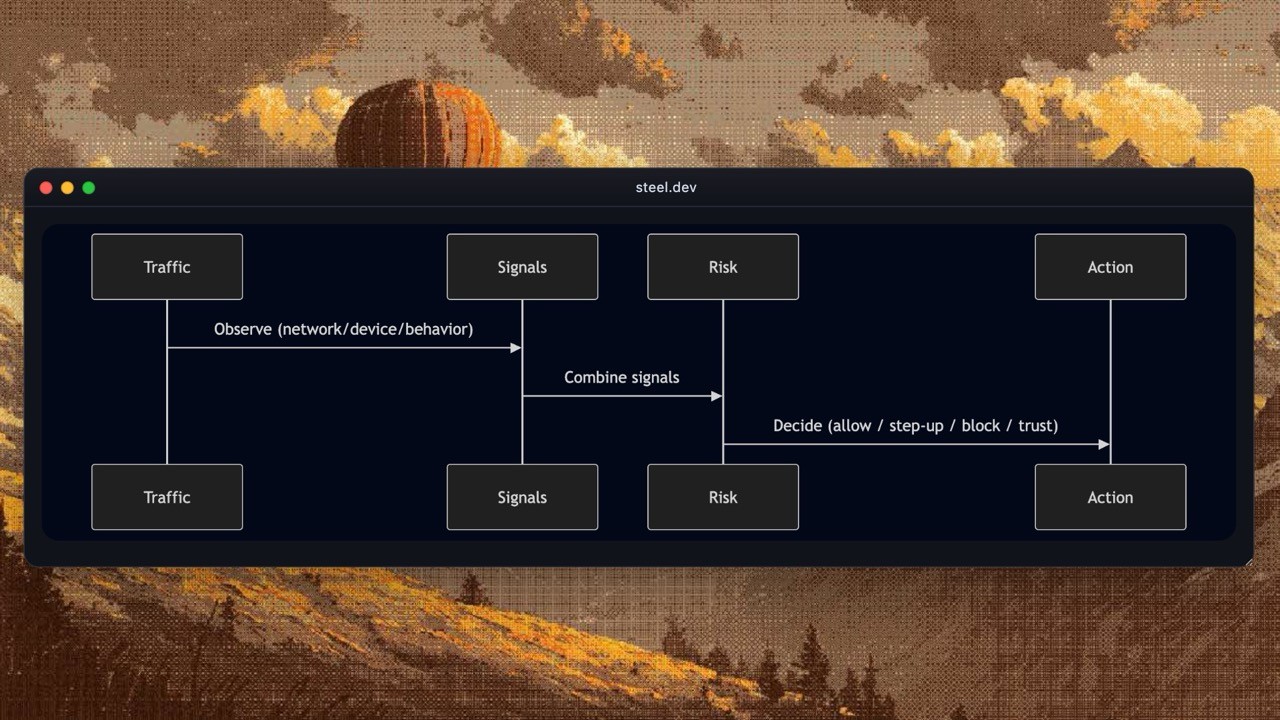
The Four Layers of Detection (The Anti-Bot Model)

Modern anti-bot systems don’t rely on one trick.

They use a stacked decision process, combining multiple signals into a risk score. Here’s the simplified mental model:
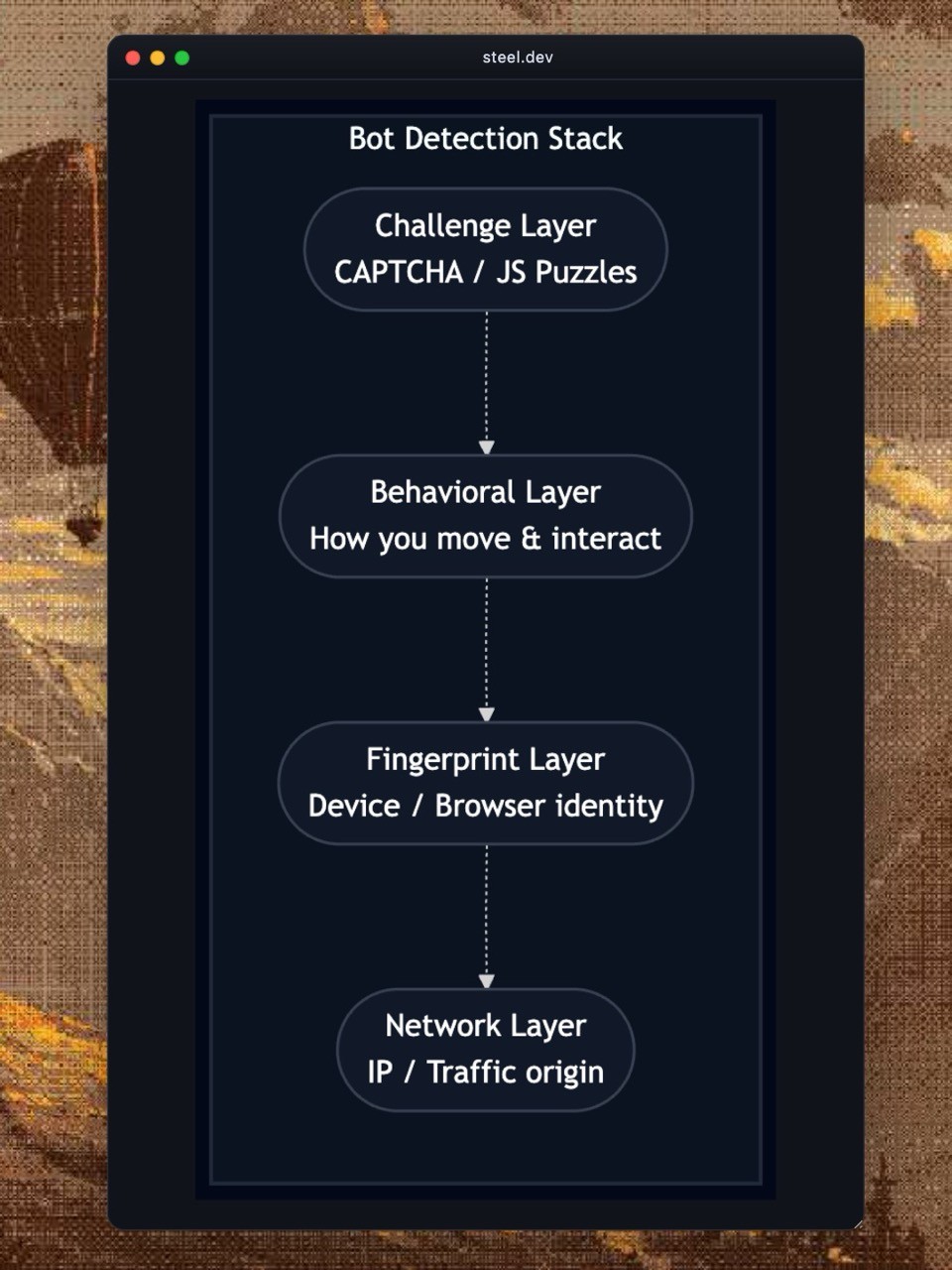
The Four Detection Layers

Each layer catches different kinds of bots.

To avoid false positives, ethical automation must understand how all of these layers work.

1. Network-Level Adaptation: Don't Arrive Like a Stampede

Before websites look at browsers or behavior, they inspect traffic at the network level.

Datacenter vs Residential IPs

Many malicious bots run on datacenter IPs, so legitimate bots using cloud servers may get flagged automatically.

Ethical automation sometimes uses:

  • Residential IPs

  • ISP-issued IP ranges

  • Mobile carrier IPs

But only when appropriate, such as geo-specific research or compatibility testing.

Traffic That Feels Human (or at Least Polite)

Good bots should:

  • Avoid rapid-fire bursts

  • Spread requests naturally

  • Pause between pages

  • Follow crawl-delay settings

  • Avoid crawling high-load sections at peak times

Polite Request Frequency

2. Browser Fingerprint Adaptation: Looking Like a Real Browser

When automation frameworks like Playwright or Selenium run in their default configuration, they leave a trail of tiny “runtime leaks” that websites can detect.

Some common leaks:

  • Missing or empty plugin lists

  • Incorrect WebGL renderer

  • Strange canvas output

  • Mismatched timezone or locale

  • Unusual error stack traces

  • Incomplete API implementations

To avoid misclassification, ethical tools try to match real browser behavior.

Here are some common overrides that automation tools apply to avoid an unusual or easily identifiable fingerprint.

Navigator & Device Metadata Override

This snippet adjusts core navigator fields that many fingerprint checks inspect first.

// Override User Agent
Object.defineProperty(navigator, 'userAgent', {
get: () => "Mozilla/5.0 (XWindows NT 11; Linux x86_64) AppleWebKit/537.36 (KHTML, like Gecko) Chrome/136.0.0.0 Safari/537.36",
configurable: true
});

// Override Hardware Concurrency
Object.defineProperty(navigator, 'hardwareConcurrency', {
get: () => 4,
configurable: true
});

// Override Platform
Object.defineProperty(navigator, 'platform', {
get: () => "Linux",
configurable: true
});

// Override Battery API
Object.defineProperty(navigator, 'getBattery', {
  value: async function() {
    return {
      charging: true,
      chargingTime: 0,
      dischargingTime: Infinity,
      level: 1.0,
      addEventListener: () => {},
      removeEventListener: () => {}
    };
  },
  configurable: true
});

// Test it
console.log("User Agent:", navigator.userAgent);
console.log("Hardware Concurrency:", navigator.hardwareConcurrency);
console.log("Platform:", navigator.platform);

navigator.getBattery().then(battery => {
  console.log("Battery Level:", battery.level);
  console.log("Battery Charging:", battery.charging);
});
// Override User Agent
Object.defineProperty(navigator, 'userAgent', {
get: () => "Mozilla/5.0 (XWindows NT 11; Linux x86_64) AppleWebKit/537.36 (KHTML, like Gecko) Chrome/136.0.0.0 Safari/537.36",
configurable: true
});

// Override Hardware Concurrency
Object.defineProperty(navigator, 'hardwareConcurrency', {
get: () => 4,
configurable: true
});

// Override Platform
Object.defineProperty(navigator, 'platform', {
get: () => "Linux",
configurable: true
});

// Override Battery API
Object.defineProperty(navigator, 'getBattery', {
  value: async function() {
    return {
      charging: true,
      chargingTime: 0,
      dischargingTime: Infinity,
      level: 1.0,
      addEventListener: () => {},
      removeEventListener: () => {}
    };
  },
  configurable: true
});

// Test it
console.log("User Agent:", navigator.userAgent);
console.log("Hardware Concurrency:", navigator.hardwareConcurrency);
console.log("Platform:", navigator.platform);

navigator.getBattery().then(battery => {
  console.log("Battery Level:", battery.level);
  console.log("Battery Charging:", battery.charging);
});
// Override User Agent
Object.defineProperty(navigator, 'userAgent', {
get: () => "Mozilla/5.0 (XWindows NT 11; Linux x86_64) AppleWebKit/537.36 (KHTML, like Gecko) Chrome/136.0.0.0 Safari/537.36",
configurable: true
});

// Override Hardware Concurrency
Object.defineProperty(navigator, 'hardwareConcurrency', {
get: () => 4,
configurable: true
});

// Override Platform
Object.defineProperty(navigator, 'platform', {
get: () => "Linux",
configurable: true
});

// Override Battery API
Object.defineProperty(navigator, 'getBattery', {
  value: async function() {
    return {
      charging: true,
      chargingTime: 0,
      dischargingTime: Infinity,
      level: 1.0,
      addEventListener: () => {},
      removeEventListener: () => {}
    };
  },
  configurable: true
});

// Test it
console.log("User Agent:", navigator.userAgent);
console.log("Hardware Concurrency:", navigator.hardwareConcurrency);
console.log("Platform:", navigator.platform);

navigator.getBattery().then(battery => {
  console.log("Battery Level:", battery.level);
  console.log("Battery Charging:", battery.charging);
});
// Override User Agent
Object.defineProperty(navigator, 'userAgent', {
get: () => "Mozilla/5.0 (XWindows NT 11; Linux x86_64) AppleWebKit/537.36 (KHTML, like Gecko) Chrome/136.0.0.0 Safari/537.36",
configurable: true
});

// Override Hardware Concurrency
Object.defineProperty(navigator, 'hardwareConcurrency', {
get: () => 4,
configurable: true
});

// Override Platform
Object.defineProperty(navigator, 'platform', {
get: () => "Linux",
configurable: true
});

// Override Battery API
Object.defineProperty(navigator, 'getBattery', {
  value: async function() {
    return {
      charging: true,
      chargingTime: 0,
      dischargingTime: Infinity,
      level: 1.0,
      addEventListener: () => {},
      removeEventListener: () => {}
    };
  },
  configurable: true
});

// Test it
console.log("User Agent:", navigator.userAgent);
console.log("Hardware Concurrency:", navigator.hardwareConcurrency);
console.log("Platform:", navigator.platform);

navigator.getBattery().then(battery => {
  console.log("Battery Level:", battery.level);
  console.log("Battery Charging:", battery.charging);
});

WebGL Vendor & Renderer Override

This example patches WebGL identity values, which are common high-signal fingerprint inputs.

// Store original getParameter
const originalGetParameter = WebGLRenderingContext.prototype.getParameter;

// Override WebGL parameters
WebGLRenderingContext.prototype.getParameter = function(parameter) {
  // UNMASKED_VENDOR_WEBGL
  if (parameter === 37445) {
    return "Intel Inc.";
  }
  // UNMASKED_RENDERER_WEBGL
  if (parameter === 37446) {
    return "Intel Iris OpenGL Engine";
  }
  return originalGetParameter.call(this, parameter);
};

// Also override for WebGL2
if (window.WebGL2RenderingContext) {
  const originalGetParameter2 = WebGL2RenderingContext.prototype.getParameter;
  WebGL2RenderingContext.prototype.getParameter = function(parameter) {
    if (parameter === 37445) return "Intel Inc.";
    if (parameter === 37446) return "Intel Iris OpenGL Engine";
    return originalGetParameter2.call(this, parameter);
  };
}

// Test it
const canvas = document.createElement('canvas');
const gl = canvas.getContext('webgl') || canvas.getContext('experimental-webgl');
if (gl) {
  console.log("WebGL Vendor:", gl.getParameter(37445));
  console.log("WebGL Renderer:", gl.getParameter(37446));
}
// Store original getParameter
const originalGetParameter = WebGLRenderingContext.prototype.getParameter;

// Override WebGL parameters
WebGLRenderingContext.prototype.getParameter = function(parameter) {
  // UNMASKED_VENDOR_WEBGL
  if (parameter === 37445) {
    return "Intel Inc.";
  }
  // UNMASKED_RENDERER_WEBGL
  if (parameter === 37446) {
    return "Intel Iris OpenGL Engine";
  }
  return originalGetParameter.call(this, parameter);
};

// Also override for WebGL2
if (window.WebGL2RenderingContext) {
  const originalGetParameter2 = WebGL2RenderingContext.prototype.getParameter;
  WebGL2RenderingContext.prototype.getParameter = function(parameter) {
    if (parameter === 37445) return "Intel Inc.";
    if (parameter === 37446) return "Intel Iris OpenGL Engine";
    return originalGetParameter2.call(this, parameter);
  };
}

// Test it
const canvas = document.createElement('canvas');
const gl = canvas.getContext('webgl') || canvas.getContext('experimental-webgl');
if (gl) {
  console.log("WebGL Vendor:", gl.getParameter(37445));
  console.log("WebGL Renderer:", gl.getParameter(37446));
}
// Store original getParameter
const originalGetParameter = WebGLRenderingContext.prototype.getParameter;

// Override WebGL parameters
WebGLRenderingContext.prototype.getParameter = function(parameter) {
  // UNMASKED_VENDOR_WEBGL
  if (parameter === 37445) {
    return "Intel Inc.";
  }
  // UNMASKED_RENDERER_WEBGL
  if (parameter === 37446) {
    return "Intel Iris OpenGL Engine";
  }
  return originalGetParameter.call(this, parameter);
};

// Also override for WebGL2
if (window.WebGL2RenderingContext) {
  const originalGetParameter2 = WebGL2RenderingContext.prototype.getParameter;
  WebGL2RenderingContext.prototype.getParameter = function(parameter) {
    if (parameter === 37445) return "Intel Inc.";
    if (parameter === 37446) return "Intel Iris OpenGL Engine";
    return originalGetParameter2.call(this, parameter);
  };
}

// Test it
const canvas = document.createElement('canvas');
const gl = canvas.getContext('webgl') || canvas.getContext('experimental-webgl');
if (gl) {
  console.log("WebGL Vendor:", gl.getParameter(37445));
  console.log("WebGL Renderer:", gl.getParameter(37446));
}
// Store original getParameter
const originalGetParameter = WebGLRenderingContext.prototype.getParameter;

// Override WebGL parameters
WebGLRenderingContext.prototype.getParameter = function(parameter) {
  // UNMASKED_VENDOR_WEBGL
  if (parameter === 37445) {
    return "Intel Inc.";
  }
  // UNMASKED_RENDERER_WEBGL
  if (parameter === 37446) {
    return "Intel Iris OpenGL Engine";
  }
  return originalGetParameter.call(this, parameter);
};

// Also override for WebGL2
if (window.WebGL2RenderingContext) {
  const originalGetParameter2 = WebGL2RenderingContext.prototype.getParameter;
  WebGL2RenderingContext.prototype.getParameter = function(parameter) {
    if (parameter === 37445) return "Intel Inc.";
    if (parameter === 37446) return "Intel Iris OpenGL Engine";
    return originalGetParameter2.call(this, parameter);
  };
}

// Test it
const canvas = document.createElement('canvas');
const gl = canvas.getContext('webgl') || canvas.getContext('experimental-webgl');
if (gl) {
  console.log("WebGL Vendor:", gl.getParameter(37445));
  console.log("WebGL Renderer:", gl.getParameter(37446));
}

Screen, Timezone & Locale Override

This block aligns display and locale signals so they stay consistent with expected session context.

// Override Screen dimensions
Object.defineProperty(screen, 'width', {
  get: () => 1920,
  configurable: true
});

Object.defineProperty(screen, 'height', {
  get: () => 1080,
  configurable: true
});

Object.defineProperty(screen, 'availWidth', {
  get: () => 1920,
  configurable: true
});

Object.defineProperty(screen, 'availHeight', {
  get: () => 1040,
  configurable: true
});

// Override Timezone
const originalResolvedOptions = Intl.DateTimeFormat.prototype.resolvedOptions;
Intl.DateTimeFormat.prototype.resolvedOptions = function() {
  const options = originalResolvedOptions.call(this);
  options.timeZone = "America/New_York";
  options.locale = "en-US";
  return options;
};

// Test it
console.log("Screen Width:", screen.width);
console.log("Screen Height:", screen.height);
console.log("Timezone:", Intl.DateTimeFormat().resolvedOptions().timeZone);
console.log("Locale:", Intl.DateTimeFormat().resolvedOptions().locale);
// Override Screen dimensions
Object.defineProperty(screen, 'width', {
  get: () => 1920,
  configurable: true
});

Object.defineProperty(screen, 'height', {
  get: () => 1080,
  configurable: true
});

Object.defineProperty(screen, 'availWidth', {
  get: () => 1920,
  configurable: true
});

Object.defineProperty(screen, 'availHeight', {
  get: () => 1040,
  configurable: true
});

// Override Timezone
const originalResolvedOptions = Intl.DateTimeFormat.prototype.resolvedOptions;
Intl.DateTimeFormat.prototype.resolvedOptions = function() {
  const options = originalResolvedOptions.call(this);
  options.timeZone = "America/New_York";
  options.locale = "en-US";
  return options;
};

// Test it
console.log("Screen Width:", screen.width);
console.log("Screen Height:", screen.height);
console.log("Timezone:", Intl.DateTimeFormat().resolvedOptions().timeZone);
console.log("Locale:", Intl.DateTimeFormat().resolvedOptions().locale);
// Override Screen dimensions
Object.defineProperty(screen, 'width', {
  get: () => 1920,
  configurable: true
});

Object.defineProperty(screen, 'height', {
  get: () => 1080,
  configurable: true
});

Object.defineProperty(screen, 'availWidth', {
  get: () => 1920,
  configurable: true
});

Object.defineProperty(screen, 'availHeight', {
  get: () => 1040,
  configurable: true
});

// Override Timezone
const originalResolvedOptions = Intl.DateTimeFormat.prototype.resolvedOptions;
Intl.DateTimeFormat.prototype.resolvedOptions = function() {
  const options = originalResolvedOptions.call(this);
  options.timeZone = "America/New_York";
  options.locale = "en-US";
  return options;
};

// Test it
console.log("Screen Width:", screen.width);
console.log("Screen Height:", screen.height);
console.log("Timezone:", Intl.DateTimeFormat().resolvedOptions().timeZone);
console.log("Locale:", Intl.DateTimeFormat().resolvedOptions().locale);
// Override Screen dimensions
Object.defineProperty(screen, 'width', {
  get: () => 1920,
  configurable: true
});

Object.defineProperty(screen, 'height', {
  get: () => 1080,
  configurable: true
});

Object.defineProperty(screen, 'availWidth', {
  get: () => 1920,
  configurable: true
});

Object.defineProperty(screen, 'availHeight', {
  get: () => 1040,
  configurable: true
});

// Override Timezone
const originalResolvedOptions = Intl.DateTimeFormat.prototype.resolvedOptions;
Intl.DateTimeFormat.prototype.resolvedOptions = function() {
  const options = originalResolvedOptions.call(this);
  options.timeZone = "America/New_York";
  options.locale = "en-US";
  return options;
};

// Test it
console.log("Screen Width:", screen.width);
console.log("Screen Height:", screen.height);
console.log("Timezone:", Intl.DateTimeFormat().resolvedOptions().timeZone);
console.log("Locale:", Intl.DateTimeFormat().resolvedOptions().locale);

Language and Plugins Override

This section covers language and plugin fields that scripts often use for quick client validation.

// Override Languages
Object.defineProperty(navigator, 'language', {
  get: () => "en-US",
  configurable: true
});

Object.defineProperty(navigator, 'languages', {
  get: () => ["en-US", "en"],
  configurable: true
});

// Override Plugins (appear as if Chrome with standard plugins)
// Note: Chrome typically shows 3-5 PDF-related plugins
// For realistic spoofing, you can create actual plugin objects like:
// - "PDF Viewer" (internal-pdf-viewer)
// - "Chrome PDF Viewer"
// - "Chromium PDF Viewer"
// Each plugin should have: name, filename, description, length, item(), namedItem()
// And contain MimeType objects with: type, suffixes, description, enabledPlugin
Object.defineProperty(navigator, 'plugins', {
  get: () => {
    return {
      length: 3,
      item: (i) => null, /
      namedItem: (name) => null,
      refresh: () => {}
    };
  },
  configurable: true
});

// Test it
console.log("Language:", navigator.language);
console.log("Languages:", navigator.languages);
console.log("Plugin count:", navigator.plugins.length);
// Override Languages
Object.defineProperty(navigator, 'language', {
  get: () => "en-US",
  configurable: true
});

Object.defineProperty(navigator, 'languages', {
  get: () => ["en-US", "en"],
  configurable: true
});

// Override Plugins (appear as if Chrome with standard plugins)
// Note: Chrome typically shows 3-5 PDF-related plugins
// For realistic spoofing, you can create actual plugin objects like:
// - "PDF Viewer" (internal-pdf-viewer)
// - "Chrome PDF Viewer"
// - "Chromium PDF Viewer"
// Each plugin should have: name, filename, description, length, item(), namedItem()
// And contain MimeType objects with: type, suffixes, description, enabledPlugin
Object.defineProperty(navigator, 'plugins', {
  get: () => {
    return {
      length: 3,
      item: (i) => null, /
      namedItem: (name) => null,
      refresh: () => {}
    };
  },
  configurable: true
});

// Test it
console.log("Language:", navigator.language);
console.log("Languages:", navigator.languages);
console.log("Plugin count:", navigator.plugins.length);
// Override Languages
Object.defineProperty(navigator, 'language', {
  get: () => "en-US",
  configurable: true
});

Object.defineProperty(navigator, 'languages', {
  get: () => ["en-US", "en"],
  configurable: true
});

// Override Plugins (appear as if Chrome with standard plugins)
// Note: Chrome typically shows 3-5 PDF-related plugins
// For realistic spoofing, you can create actual plugin objects like:
// - "PDF Viewer" (internal-pdf-viewer)
// - "Chrome PDF Viewer"
// - "Chromium PDF Viewer"
// Each plugin should have: name, filename, description, length, item(), namedItem()
// And contain MimeType objects with: type, suffixes, description, enabledPlugin
Object.defineProperty(navigator, 'plugins', {
  get: () => {
    return {
      length: 3,
      item: (i) => null, /
      namedItem: (name) => null,
      refresh: () => {}
    };
  },
  configurable: true
});

// Test it
console.log("Language:", navigator.language);
console.log("Languages:", navigator.languages);
console.log("Plugin count:", navigator.plugins.length);
// Override Languages
Object.defineProperty(navigator, 'language', {
  get: () => "en-US",
  configurable: true
});

Object.defineProperty(navigator, 'languages', {
  get: () => ["en-US", "en"],
  configurable: true
});

// Override Plugins (appear as if Chrome with standard plugins)
// Note: Chrome typically shows 3-5 PDF-related plugins
// For realistic spoofing, you can create actual plugin objects like:
// - "PDF Viewer" (internal-pdf-viewer)
// - "Chrome PDF Viewer"
// - "Chromium PDF Viewer"
// Each plugin should have: name, filename, description, length, item(), namedItem()
// And contain MimeType objects with: type, suffixes, description, enabledPlugin
Object.defineProperty(navigator, 'plugins', {
  get: () => {
    return {
      length: 3,
      item: (i) => null, /
      namedItem: (name) => null,
      refresh: () => {}
    };
  },
  configurable: true
});

// Test it
console.log("Language:", navigator.language);
console.log("Languages:", navigator.languages);
console.log("Plugin count:", navigator.plugins.length);

These overrides must run before page load so the site sees these values during fingerprint checks. This is only a small part of the full surface area.

The Hidden Problem With Overrides: JavaScript Reveals the Patch

Overrides like this look simple:

WebGLRenderingContext.prototype.getParameter = function(parameter) {
  if (parameter === 37445)
    return "Intel Inc.";
  if (parameter === 37446)
    return "Intel Iris OpenGL Engine";
  return originalGetParameter.call(this, parameter);
};
WebGLRenderingContext.prototype.getParameter = function(parameter) {
  if (parameter === 37445)
    return "Intel Inc.";
  if (parameter === 37446)
    return "Intel Iris OpenGL Engine";
  return originalGetParameter.call(this, parameter);
};
WebGLRenderingContext.prototype.getParameter = function(parameter) {
  if (parameter === 37445)
    return "Intel Inc.";
  if (parameter === 37446)
    return "Intel Iris OpenGL Engine";
  return originalGetParameter.call(this, parameter);
};
WebGLRenderingContext.prototype.getParameter = function(parameter) {
  if (parameter === 37445)
    return "Intel Inc.";
  if (parameter === 37446)
    return "Intel Iris OpenGL Engine";
  return originalGetParameter.call(this, parameter);
};

But the moment you change a browser property, JavaScript starts revealing clues.

Here is what the WebGL getParameter() function looks like in a real browser versus after an override:

  • WebGLRenderingContext.prototype.getParameter.toString()

    • Native: "function getParameter() { [native code] }"

    • Override: "function(param) { if (param === 37445) return 'Intel Inc.'; ... }"

  • WebGLRenderingContext.prototype.getParameter.name

    • Native: "getParameter"

    • Override: ""

  • Function.toString.call(WebGLRenderingContext.prototype.getParameter)

    • Native: "function getParameter() { [native code] }"

    • Override: "function(param) { if (param === 37445) return 'Intel Inc.'; ... }"

Even though the override returns believable GPU values, the function no longer looks like a native browser function, so fingerprinting scripts catch it immediately.

So you fix one leak, another appears, and maintenance cost rises fast. At that point, you are effectively playing whack-a-mole with the JavaScript runtime.

3. Behavioral Simulation: Acting Less Like a Script, More Like a Person

Humans:

  • Scroll slowly

  • Hesitate before clicking

  • Move unpredictably

  • Pause to read text

Bots do none of that by default.

Ethical automation uses natural interaction patterns to reduce aggressive traffic patterns and avoid stressing servers.

Human-Like Delays & Interaction

This snippet adds bounded waits and interaction pacing to avoid perfectly timed action patterns.

// Human-like behavior module
const humanBehavior = {

  // Random delay between actions
  async wait(min = 80, max = 200) {
    const time = min + Math.random() * (max - min);
    return new Promise(resolve => setTimeout(resolve, time));
  },

  // Move mouse to a random point inside the element
	async moveToElement(el) {
	  const box = el.getBoundingClientRect();

		// Starting pint
	  const sX = Math.random() * window.innerWidth;
	  const sY = Math.random() * window.innerHeight;

		// Targent pint
	  const tX = box.left + Math.random() * box.width;
	  const tY = box.top + Math.random() * box.height;

	  const steps = 12; // Number of movements

	  for (let i = 0; i < steps; i++) {
	    const progress = i / steps;
	    const x = sX + (tX - sX) * progress + Math.random() * 2;
	    const y = sY + (tY - sY) * progress + Math.random() * 2;

	    window.dispatchEvent(
	    new MouseEvent("mousemove", { clientX: x, clientY: y }));
	    await this.wait(20, 40); // small human-like pauses
	  }
	}

  // Click with a tiny human-like pause
  async click(el) {
    await this.moveToElement(el);
    window.dispatchEvent(new MouseEvent("mousedown"));
    await this.wait(50, 120);
    window.dispatchEvent(new MouseEvent("mouseup"));
  },

  // Full simulation: move → wait → click → wait
  async simulate(el) {
    await this.moveToElement(el);
    await this.wait(100, 250);
    await this.click(el);
    await this.wait(150, 300);
  }
};

// Example of calling it in puppeteer
await page.evaluate(() => {
  humanBehavior.simulate(document.querySelector("button.login"));
});
// Human-like behavior module
const humanBehavior = {

  // Random delay between actions
  async wait(min = 80, max = 200) {
    const time = min + Math.random() * (max - min);
    return new Promise(resolve => setTimeout(resolve, time));
  },

  // Move mouse to a random point inside the element
	async moveToElement(el) {
	  const box = el.getBoundingClientRect();

		// Starting pint
	  const sX = Math.random() * window.innerWidth;
	  const sY = Math.random() * window.innerHeight;

		// Targent pint
	  const tX = box.left + Math.random() * box.width;
	  const tY = box.top + Math.random() * box.height;

	  const steps = 12; // Number of movements

	  for (let i = 0; i < steps; i++) {
	    const progress = i / steps;
	    const x = sX + (tX - sX) * progress + Math.random() * 2;
	    const y = sY + (tY - sY) * progress + Math.random() * 2;

	    window.dispatchEvent(
	    new MouseEvent("mousemove", { clientX: x, clientY: y }));
	    await this.wait(20, 40); // small human-like pauses
	  }
	}

  // Click with a tiny human-like pause
  async click(el) {
    await this.moveToElement(el);
    window.dispatchEvent(new MouseEvent("mousedown"));
    await this.wait(50, 120);
    window.dispatchEvent(new MouseEvent("mouseup"));
  },

  // Full simulation: move → wait → click → wait
  async simulate(el) {
    await this.moveToElement(el);
    await this.wait(100, 250);
    await this.click(el);
    await this.wait(150, 300);
  }
};

// Example of calling it in puppeteer
await page.evaluate(() => {
  humanBehavior.simulate(document.querySelector("button.login"));
});
// Human-like behavior module
const humanBehavior = {

  // Random delay between actions
  async wait(min = 80, max = 200) {
    const time = min + Math.random() * (max - min);
    return new Promise(resolve => setTimeout(resolve, time));
  },

  // Move mouse to a random point inside the element
	async moveToElement(el) {
	  const box = el.getBoundingClientRect();

		// Starting pint
	  const sX = Math.random() * window.innerWidth;
	  const sY = Math.random() * window.innerHeight;

		// Targent pint
	  const tX = box.left + Math.random() * box.width;
	  const tY = box.top + Math.random() * box.height;

	  const steps = 12; // Number of movements

	  for (let i = 0; i < steps; i++) {
	    const progress = i / steps;
	    const x = sX + (tX - sX) * progress + Math.random() * 2;
	    const y = sY + (tY - sY) * progress + Math.random() * 2;

	    window.dispatchEvent(
	    new MouseEvent("mousemove", { clientX: x, clientY: y }));
	    await this.wait(20, 40); // small human-like pauses
	  }
	}

  // Click with a tiny human-like pause
  async click(el) {
    await this.moveToElement(el);
    window.dispatchEvent(new MouseEvent("mousedown"));
    await this.wait(50, 120);
    window.dispatchEvent(new MouseEvent("mouseup"));
  },

  // Full simulation: move → wait → click → wait
  async simulate(el) {
    await this.moveToElement(el);
    await this.wait(100, 250);
    await this.click(el);
    await this.wait(150, 300);
  }
};

// Example of calling it in puppeteer
await page.evaluate(() => {
  humanBehavior.simulate(document.querySelector("button.login"));
});
// Human-like behavior module
const humanBehavior = {

  // Random delay between actions
  async wait(min = 80, max = 200) {
    const time = min + Math.random() * (max - min);
    return new Promise(resolve => setTimeout(resolve, time));
  },

  // Move mouse to a random point inside the element
	async moveToElement(el) {
	  const box = el.getBoundingClientRect();

		// Starting pint
	  const sX = Math.random() * window.innerWidth;
	  const sY = Math.random() * window.innerHeight;

		// Targent pint
	  const tX = box.left + Math.random() * box.width;
	  const tY = box.top + Math.random() * box.height;

	  const steps = 12; // Number of movements

	  for (let i = 0; i < steps; i++) {
	    const progress = i / steps;
	    const x = sX + (tX - sX) * progress + Math.random() * 2;
	    const y = sY + (tY - sY) * progress + Math.random() * 2;

	    window.dispatchEvent(
	    new MouseEvent("mousemove", { clientX: x, clientY: y }));
	    await this.wait(20, 40); // small human-like pauses
	  }
	}

  // Click with a tiny human-like pause
  async click(el) {
    await this.moveToElement(el);
    window.dispatchEvent(new MouseEvent("mousedown"));
    await this.wait(50, 120);
    window.dispatchEvent(new MouseEvent("mouseup"));
  },

  // Full simulation: move → wait → click → wait
  async simulate(el) {
    await this.moveToElement(el);
    await this.wait(100, 250);
    await this.click(el);
    await this.wait(150, 300);
  }
};

// Example of calling it in puppeteer
await page.evaluate(() => {
  humanBehavior.simulate(document.querySelector("button.login"));
});

Human Interaction Flow

This compact sequence summarizes the pacing pattern shown in the previous example.

4. Challenge Handling: Working With Verification, Not Around It

At some point, your automation will hit verification, usually a CAPTCHA or JavaScript challenge. These systems are meant to stop harmful bots. The goal is not to beat challenges, it is to handle them responsibly.

Here is how ethical automation should approach verification:

Ask The Site For A Whitelist

If your automation has a legitimate purpose, many website owners will whitelist your crawler. This can remove unnecessary friction immediately.

Use API Keys Or OAuth When Available

Some websites already offer official developer APIs that expose the same data you are trying to access.

Use CAPTCHA Solvers Only As A Careful, Last-Resort Option

CAPTCHA-solving services exist, but ethical automation should treat them as a backup plan. Consider them only when:

  • The Data Is Fully Public

  • The Site Does Not Provide An API

  • You Are Respecting Robots.txt

  • You Are Staying Within Reasonable Rate Limits

Even in these situations, solving should remain rare, polite, and carefully controlled.

Not all CAPTCHA solvers work the same way. Some rely on human operators, some use machine learning, and others use large pools of automated browsers. Speed, accuracy, and cost vary by method.

Where Ethical Automation Actually Helps the Web

Here are real, positive examples where automation must adjust to avoid false positives:

  • Search Engines: Must crawl public pages without breaking sites.

  • AI Dataset Builders: Collect public content, cite sources, and respect limits.

  • SEO / Accessibility Tools: Run periodic checks on performance, metadata, and compliance.

  • Web Archiving Initiatives: Preserve digital history responsibly.

  • Research Labs: Analyze public content for trends, policy studies, and academic data.

Conclusion: Responsible Automation Makes the Web Better

Automation powers the internet.

It indexes, analyzes, monitors, verifies, archives, and tests the web at a scale no human ever could. But because malicious bots abuse the same techniques, anti-bot systems are forced to be strict.

By understanding these systems, network checks, fingerprinting logic, behavior analysis, and verification flows, you can build automation that:

  • Is respectful

  • Is compliant

  • Avoids false positives

  • Plays nicely with servers

  • And contributes positively to the web ecosystem

Done right, automation is not a threat, it is an essential tool that keeps the modern internet running.

Ready to

Build with Steel?

Ready to

Build with Steel?

Ready to

Build with Steel?

Ready to Build with Steel?

A better way to take your LLMs online.

© Steel · Inc. 2025.

All Systems Operational

Platform

Join the community