Dedicated IPs give production agents a stable network origin
Dedicated IPs give production agents a stable network origin
Dedicated IPs give production agents a stable network origin
/
/
San Francisco
San Francisco
/
/

Dane Wilson
Dane Wilson

Launch Week v3 -> Day 02 / 05
Agents that log in need a stable network origin.
If you reuse a profile across sessions, you’ve probably run into the impossible travel problem, even if you never had a name for it. Steel can save the cookies and fingerprint so the browser looks the same. Then the next run comes from a different IP. To Google, Amazon, or Discord, the account just jumped across the world between requests. That is how you end up logged out, challenged, or flagged.
Dedicated IPs close that loop. Your agent comes back from the same network origin, so the login has a fair chance to stick.
How Dedicated IPs work
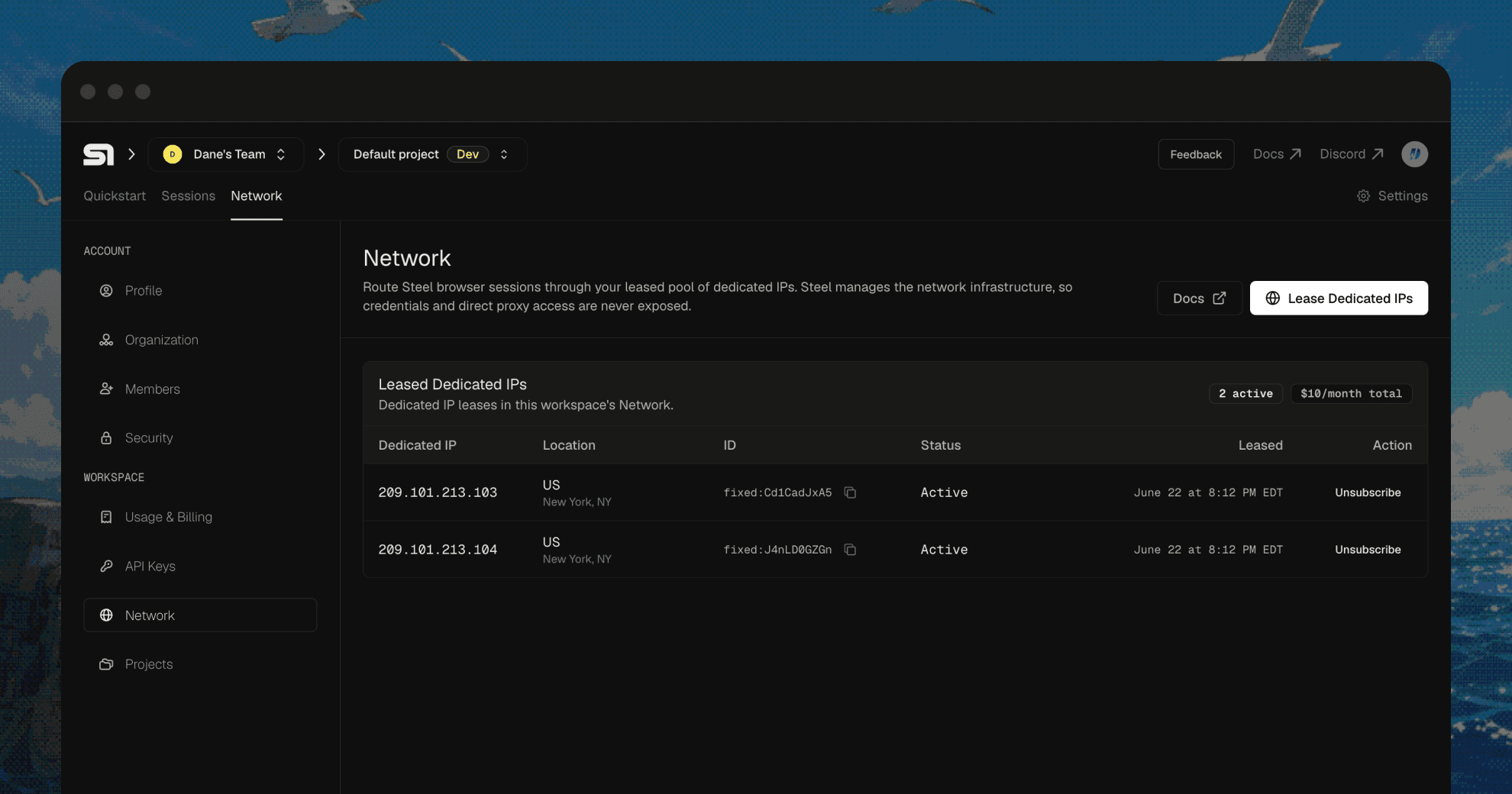
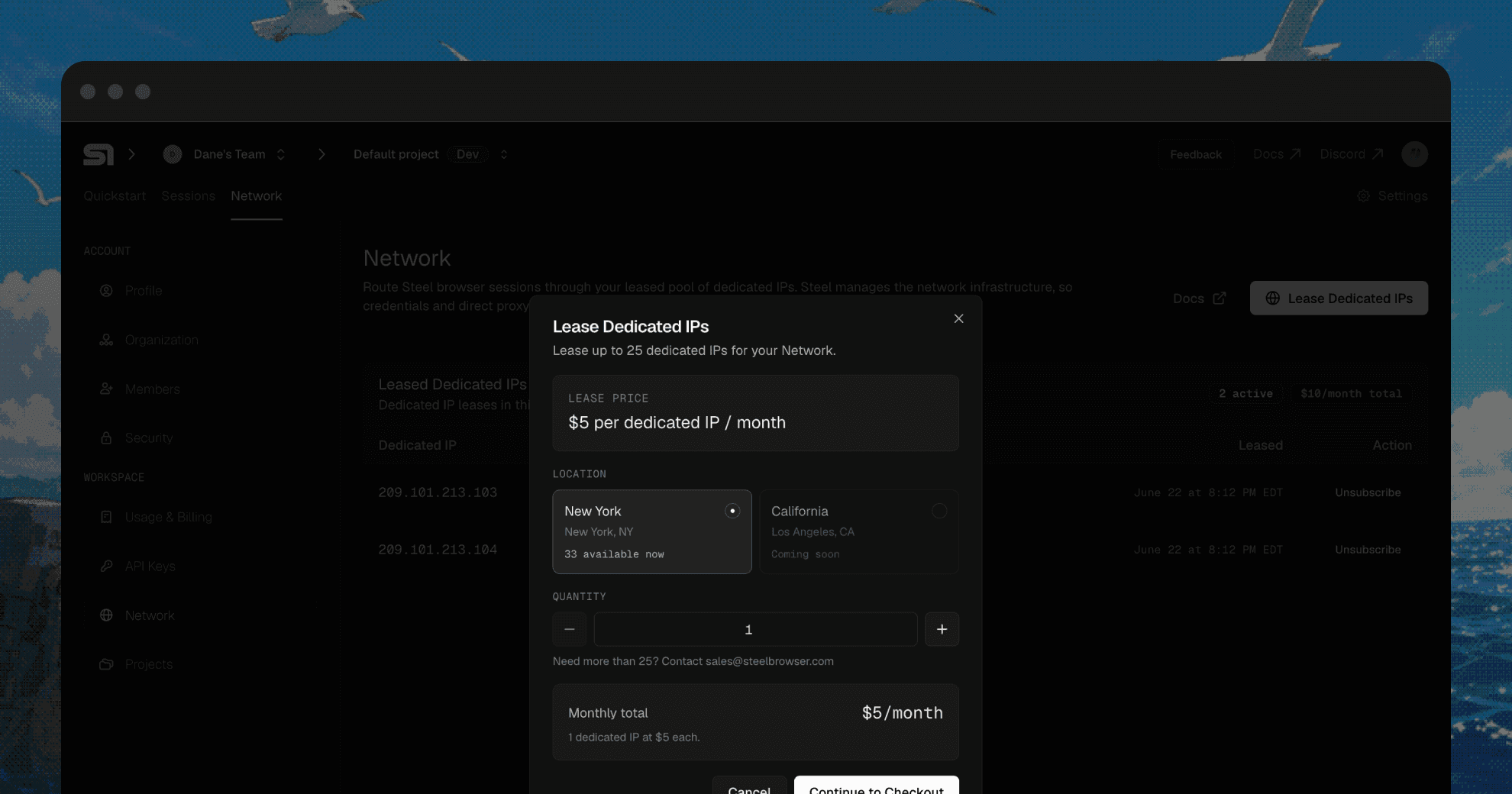
You can lease up to 25 dedicated IPs yourself from Settings > Network. If you need more, contact support. Then pin a session to a specific IP, or let Steel choose from the IPs your org owns.
// Use any of your dedicated IPs
const session = await client.sessions.create({
  useProxy: { type: "fixed" }
});

// Or pin to a specific one
const session = await client.sessions.create({
  useProxy: { type: "fixed", id: "fixed:8SdfYs77me" }
});
// Use any of your dedicated IPs
const session = await client.sessions.create({
  useProxy: { type: "fixed" }
});

// Or pin to a specific one
const session = await client.sessions.create({
  useProxy: { type: "fixed", id: "fixed:8SdfYs77me" }
});
If you pass an id, that session uses that exact IP. If you leave id out, Steel chooses one at random from your pool and persists it to the profile, so the same profile reuses the same IP across runs. The load still spreads across what you own. When you no longer need an IP, release it.
Lease and manage your IPs
The Network page in Settings handles the whole lifecycle: lease IPs, see each IP’s status, check available locations before you lease, and release an IP when you no longer need it.
Why stable IPs keep logins working
Logged-in workflows usually break in one place: the first run after you thought you were done with 2FA. Cookies and fingerprints help, but the site still sees the network origin change. The browser looks familiar. The IP does not.
Pair a Dedicated IP with a persistent profile and the boring thing happens: same browser identity, same egress IP. You log in once, then the agent can reuse that auth state across runs without a human stepping in every time. Profiles preserve browser identity. Dedicated IPs preserve network identity.
For authorized, logged-in, audited workflows, stable egress is what you want. The site sees the same returning visitor. You can allowlist a known egress IP. Your security team knows which IP belongs to which workload. If you’re reusing authentication at scale, that is the use case.
When a fixed IP is the wrong choice
Dedicated IPs have a narrow job. For high-volume, unapproved collection, a single IP can collect negative signals quickly.
A fixed IP does not make a bad workflow acceptable. A burned account still needs remediation. Site policies still apply. The strongest pattern is the boring one: a durable profile, a dedicated IP, consistent behavior, and permission to run the workflow.
Get started
Dedicated IPs are available on all paid plans. You can lease up to 25 self-serve from Settings > Network, with optional geo targeting.
Questions? Discord or @steeldotdev.
This post is Day 2 of Steel Launch Week v3. See the full week at steel.dev/launch-week.
Launch Week v3 -> Day 02 / 05
Agents that log in need a stable network origin.
If you reuse a profile across sessions, you’ve probably run into the impossible travel problem, even if you never had a name for it. Steel can save the cookies and fingerprint so the browser looks the same. Then the next run comes from a different IP. To Google, Amazon, or Discord, the account just jumped across the world between requests. That is how you end up logged out, challenged, or flagged.
Dedicated IPs close that loop. Your agent comes back from the same network origin, so the login has a fair chance to stick.
How Dedicated IPs work
You can lease up to 25 dedicated IPs yourself from Settings > Network. If you need more, contact support. Then pin a session to a specific IP, or let Steel choose from the IPs your org owns.
// Use any of your dedicated IPs
const session = await client.sessions.create({
  useProxy: { type: "fixed" }
});

// Or pin to a specific one
const session = await client.sessions.create({
  useProxy: { type: "fixed", id: "fixed:8SdfYs77me" }
});
If you pass an id, that session uses that exact IP. If you leave id out, Steel chooses one at random from your pool and persists it to the profile, so the same profile reuses the same IP across runs. The load still spreads across what you own. When you no longer need an IP, release it.
Lease and manage your IPs
The Network page in Settings handles the whole lifecycle: lease IPs, see each IP’s status, check available locations before you lease, and release an IP when you no longer need it.
Why stable IPs keep logins working
Logged-in workflows usually break in one place: the first run after you thought you were done with 2FA. Cookies and fingerprints help, but the site still sees the network origin change. The browser looks familiar. The IP does not.
Pair a Dedicated IP with a persistent profile and the boring thing happens: same browser identity, same egress IP. You log in once, then the agent can reuse that auth state across runs without a human stepping in every time. Profiles preserve browser identity. Dedicated IPs preserve network identity.
For authorized, logged-in, audited workflows, stable egress is what you want. The site sees the same returning visitor. You can allowlist a known egress IP. Your security team knows which IP belongs to which workload. If you’re reusing authentication at scale, that is the use case.
When a fixed IP is the wrong choice
Dedicated IPs have a narrow job. For high-volume, unapproved collection, a single IP can collect negative signals quickly.
A fixed IP does not make a bad workflow acceptable. A burned account still needs remediation. Site policies still apply. The strongest pattern is the boring one: a durable profile, a dedicated IP, consistent behavior, and permission to run the workflow.
Get started
Dedicated IPs are available on all paid plans. You can lease up to 25 self-serve from Settings > Network, with optional geo targeting.
Questions? Discord or @steeldotdev.
This post is Day 2 of Steel Launch Week v3. See the full week at steel.dev/launch-week.
Launch Week v3 -> Day 02 / 05
Agents that log in need a stable network origin.
If you reuse a profile across sessions, you’ve probably run into the impossible travel problem, even if you never had a name for it. Steel can save the cookies and fingerprint so the browser looks the same. Then the next run comes from a different IP. To Google, Amazon, or Discord, the account just jumped across the world between requests. That is how you end up logged out, challenged, or flagged.
Dedicated IPs close that loop. Your agent comes back from the same network origin, so the login has a fair chance to stick.
How Dedicated IPs work
You can lease up to 25 dedicated IPs yourself from Settings > Network. If you need more, contact support. Then pin a session to a specific IP, or let Steel choose from the IPs your org owns.
// Use any of your dedicated IPs
const session = await client.sessions.create({
  useProxy: { type: "fixed" }
});

// Or pin to a specific one
const session = await client.sessions.create({
  useProxy: { type: "fixed", id: "fixed:8SdfYs77me" }
});
If you pass an id, that session uses that exact IP. If you leave id out, Steel chooses one at random from your pool and persists it to the profile, so the same profile reuses the same IP across runs. The load still spreads across what you own. When you no longer need an IP, release it.
Lease and manage your IPs
The Network page in Settings handles the whole lifecycle: lease IPs, see each IP’s status, check available locations before you lease, and release an IP when you no longer need it.
Why stable IPs keep logins working
Logged-in workflows usually break in one place: the first run after you thought you were done with 2FA. Cookies and fingerprints help, but the site still sees the network origin change. The browser looks familiar. The IP does not.
Pair a Dedicated IP with a persistent profile and the boring thing happens: same browser identity, same egress IP. You log in once, then the agent can reuse that auth state across runs without a human stepping in every time. Profiles preserve browser identity. Dedicated IPs preserve network identity.
For authorized, logged-in, audited workflows, stable egress is what you want. The site sees the same returning visitor. You can allowlist a known egress IP. Your security team knows which IP belongs to which workload. If you’re reusing authentication at scale, that is the use case.
When a fixed IP is the wrong choice
Dedicated IPs have a narrow job. For high-volume, unapproved collection, a single IP can collect negative signals quickly.
A fixed IP does not make a bad workflow acceptable. A burned account still needs remediation. Site policies still apply. The strongest pattern is the boring one: a durable profile, a dedicated IP, consistent behavior, and permission to run the workflow.
Get started
Dedicated IPs are available on all paid plans. You can lease up to 25 self-serve from Settings > Network, with optional geo targeting.
Questions? Discord or @steeldotdev.
This post is Day 2 of Steel Launch Week v3. See the full week at steel.dev/launch-week.


All Systems Operational