Introducing Projects
Introducing Projects
Introducing Projects
/
/
San Francisco
San Francisco
/
/

Dane Wilson
Dane Wilson

Projects are live in Steel today: separate environments and namespaces inside a single organization. Create one for dev, one for prod, one per team or product, and scope your sessions, credentials, and profiles to each.
TL;DR Sessions, credentials, profiles, and API keys are scoped to projects. Every existing org gets a Default project with your current resources and keys already migrated in, so nothing breaks. Switch projects from the new Project Selector in the top-left nav, and promote a project from Development to Production when it's ready.
We held off on this longer than most would. Our honest opinion was that simplicity trumps complexity: one org, one bucket, nothing to configure. For a developer running agents in 2025, that was the right call.
But one bucket doesn't scale with agents. The challenge wasn't headcount, it was proliferation: one agent became a fleet, and simple scripts became multi-step workflows carrying their own credentials and profiles. All of it in the same namespace, with no line between a Tuesday experiment and the workload your customers depend on. The only way to draw one was standing up a second organization.
Projects work here the way they work everywhere else in your stack. Same org, same billing, clean boundaries.
What a project is
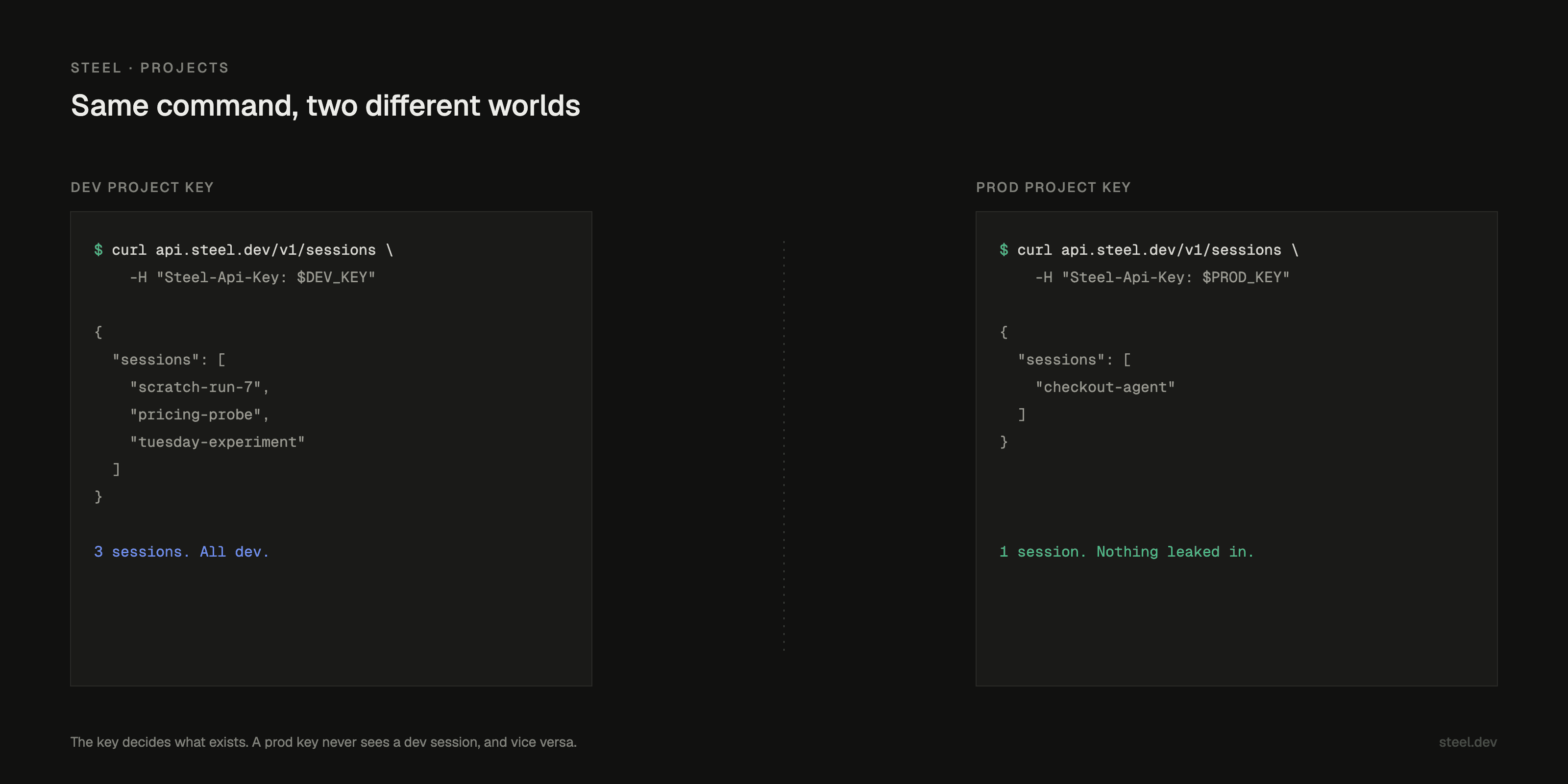
A project is an independent namespace. Nothing created in one project leaks into another. Right now that covers:
Sessions
Credentials
Profiles
That's the whole idea: separation without the overhead of a second organization.
Your resources already moved
Every organization now has a Default project, and your existing resources already migrated into it. Your code keeps working. So do your keys. There's no cutover step.
Rename the Default project or leave it alone. It's where you start; after that, the dashboard reopens whichever project you used last.
The Project Selector
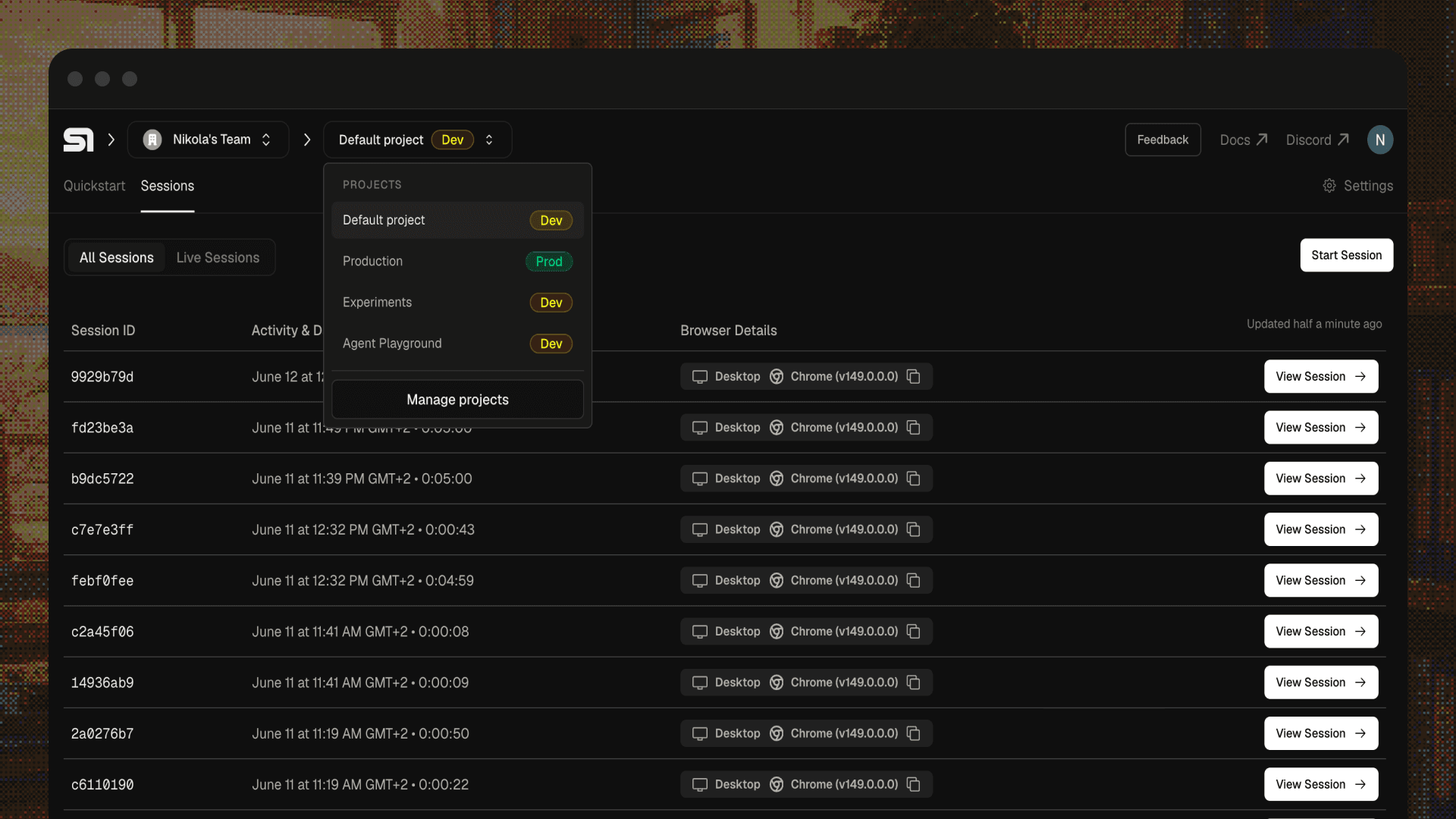
The dashboard now has a Project Selector in the top-left nav, next to the Organization Selector. Switch projects there, check each one's environment, or open Project Settings to:
Create a project
Rename a project
Set a different project as default
Promote a project to Production
Delete a project (and revoke its API keys)
Development and Production
Projects carry an environment designation. A new project starts as Development. Promote it and it turns Production, with a green badge.
Promotion is one-way. You can't downgrade a Production project back to Development. We chose a visible badge over silent config so you can tell prod from dev at a glance.
Project-scoped API keys
It works as expected. Every API key belongs to one project. When you create a key, you pick its project; the UI defaults to the one you're viewing in the Project Selector.
Your existing keys moved into the Default project, so they keep working. Sessions, credentials, and profiles you create with a key land in that key's project. A key for your prod app can't reach your dev sessions.
from steel import Steel

dev = Steel(steel_api_key=DEV_PROJECT_KEY)
prod = Steel(steel_api_key=PROD_PROJECT_KEY)

session = dev.sessions.create()

dev.sessions.list()   # includes the new session
prod.sessions.list()  # never will
from steel import Steel

dev = Steel(steel_api_key=DEV_PROJECT_KEY)
prod = Steel(steel_api_key=PROD_PROJECT_KEY)

session = dev.sessions.create()

dev.sessions.list()   # includes the new session
prod.sessions.list()  # never will
Projects themselves are managed by org admins in the dashboard. The SDK and API keys can't create, promote, or delete them.
Where this goes
Every control we want to build needs a boundary to act on, so the boundary ships first:
Production-specific permissions and deployment safeguards
Environment-based access controls and governance
Projects also show us something we couldn't see before: how you structure your workloads, and what "production" means for an agent running on the web. That shapes what we build next.
Try it
Open app.steel.dev and check the top-left nav. Your Default project is already holding everything you've built. Spin up a second project for dev, mint a project-scoped key, and point one environment at it.
Projects are live in Steel today: separate environments and namespaces inside a single organization. Create one for dev, one for prod, one per team or product, and scope your sessions, credentials, and profiles to each.
TL;DR Sessions, credentials, profiles, and API keys are scoped to projects. Every existing org gets a Default project with your current resources and keys already migrated in, so nothing breaks. Switch projects from the new Project Selector in the top-left nav, and promote a project from Development to Production when it's ready.
We held off on this longer than most would. Our honest opinion was that simplicity trumps complexity: one org, one bucket, nothing to configure. For a developer running agents in 2025, that was the right call.
But one bucket doesn't scale with agents. The challenge wasn't headcount, it was proliferation: one agent became a fleet, and simple scripts became multi-step workflows carrying their own credentials and profiles. All of it in the same namespace, with no line between a Tuesday experiment and the workload your customers depend on. The only way to draw one was standing up a second organization.
Projects work here the way they work everywhere else in your stack. Same org, same billing, clean boundaries.
What a project is
A project is an independent namespace. Nothing created in one project leaks into another. Right now that covers:
Sessions
Credentials
Profiles
That's the whole idea: separation without the overhead of a second organization.
Your resources already moved
Every organization now has a Default project, and your existing resources already migrated into it. Your code keeps working. So do your keys. There's no cutover step.
Rename the Default project or leave it alone. It's where you start; after that, the dashboard reopens whichever project you used last.
The Project Selector
The dashboard now has a Project Selector in the top-left nav, next to the Organization Selector. Switch projects there, check each one's environment, or open Project Settings to:
Create a project
Rename a project
Set a different project as default
Promote a project to Production
Delete a project (and revoke its API keys)
Development and Production
Projects carry an environment designation. A new project starts as Development. Promote it and it turns Production, with a green badge.
Promotion is one-way. You can't downgrade a Production project back to Development. We chose a visible badge over silent config so you can tell prod from dev at a glance.
Project-scoped API keys
It works as expected. Every API key belongs to one project. When you create a key, you pick its project; the UI defaults to the one you're viewing in the Project Selector.
Your existing keys moved into the Default project, so they keep working. Sessions, credentials, and profiles you create with a key land in that key's project. A key for your prod app can't reach your dev sessions.
from steel import Steel

dev = Steel(steel_api_key=DEV_PROJECT_KEY)
prod = Steel(steel_api_key=PROD_PROJECT_KEY)

session = dev.sessions.create()

dev.sessions.list()   # includes the new session
prod.sessions.list()  # never will
Projects themselves are managed by org admins in the dashboard. The SDK and API keys can't create, promote, or delete them.
Where this goes
Every control we want to build needs a boundary to act on, so the boundary ships first:
Production-specific permissions and deployment safeguards
Environment-based access controls and governance
Projects also show us something we couldn't see before: how you structure your workloads, and what "production" means for an agent running on the web. That shapes what we build next.
Try it
Open app.steel.dev and check the top-left nav. Your Default project is already holding everything you've built. Spin up a second project for dev, mint a project-scoped key, and point one environment at it.
Projects are live in Steel today: separate environments and namespaces inside a single organization. Create one for dev, one for prod, one per team or product, and scope your sessions, credentials, and profiles to each.
TL;DR Sessions, credentials, profiles, and API keys are scoped to projects. Every existing org gets a Default project with your current resources and keys already migrated in, so nothing breaks. Switch projects from the new Project Selector in the top-left nav, and promote a project from Development to Production when it's ready.
We held off on this longer than most would. Our honest opinion was that simplicity trumps complexity: one org, one bucket, nothing to configure. For a developer running agents in 2025, that was the right call.
But one bucket doesn't scale with agents. The challenge wasn't headcount, it was proliferation: one agent became a fleet, and simple scripts became multi-step workflows carrying their own credentials and profiles. All of it in the same namespace, with no line between a Tuesday experiment and the workload your customers depend on. The only way to draw one was standing up a second organization.
Projects work here the way they work everywhere else in your stack. Same org, same billing, clean boundaries.
What a project is
A project is an independent namespace. Nothing created in one project leaks into another. Right now that covers:
Sessions
Credentials
Profiles
That's the whole idea: separation without the overhead of a second organization.
Your resources already moved
Every organization now has a Default project, and your existing resources already migrated into it. Your code keeps working. So do your keys. There's no cutover step.
Rename the Default project or leave it alone. It's where you start; after that, the dashboard reopens whichever project you used last.
The Project Selector
The dashboard now has a Project Selector in the top-left nav, next to the Organization Selector. Switch projects there, check each one's environment, or open Project Settings to:
Create a project
Rename a project
Set a different project as default
Promote a project to Production
Delete a project (and revoke its API keys)
Development and Production
Projects carry an environment designation. A new project starts as Development. Promote it and it turns Production, with a green badge.
Promotion is one-way. You can't downgrade a Production project back to Development. We chose a visible badge over silent config so you can tell prod from dev at a glance.
Project-scoped API keys
It works as expected. Every API key belongs to one project. When you create a key, you pick its project; the UI defaults to the one you're viewing in the Project Selector.
Your existing keys moved into the Default project, so they keep working. Sessions, credentials, and profiles you create with a key land in that key's project. A key for your prod app can't reach your dev sessions.
from steel import Steel

dev = Steel(steel_api_key=DEV_PROJECT_KEY)
prod = Steel(steel_api_key=PROD_PROJECT_KEY)

session = dev.sessions.create()

dev.sessions.list()   # includes the new session
prod.sessions.list()  # never will
Projects themselves are managed by org admins in the dashboard. The SDK and API keys can't create, promote, or delete them.
Where this goes
Every control we want to build needs a boundary to act on, so the boundary ships first:
Production-specific permissions and deployment safeguards
Environment-based access controls and governance
Projects also show us something we couldn't see before: how you structure your workloads, and what "production" means for an agent running on the web. That shapes what we build next.
Try it
Open app.steel.dev and check the top-left nav. Your Default project is already holding everything you've built. Spin up a second project for dev, mint a project-scoped key, and point one environment at it.


All Systems Operational