Stealth Browser: A Chromium Built for Agents
Stealth Browser: A Chromium Built for Agents
Stealth Browser: A Chromium Built for Agents
/
/
San Francisco
San Francisco
/
/

Jagadesh P
Jagadesh P

Launch Week→ Day 01
Today we're shipping Stealth Browser: our own Chromium fork, hardened at the source so user-permissioned agents stop getting blocked by the web's toughest antibot systems.
It's been running in production with a handful of beta customers for a few weeks. Starting today, we're opening it to every enterprise customer at no additional cost.
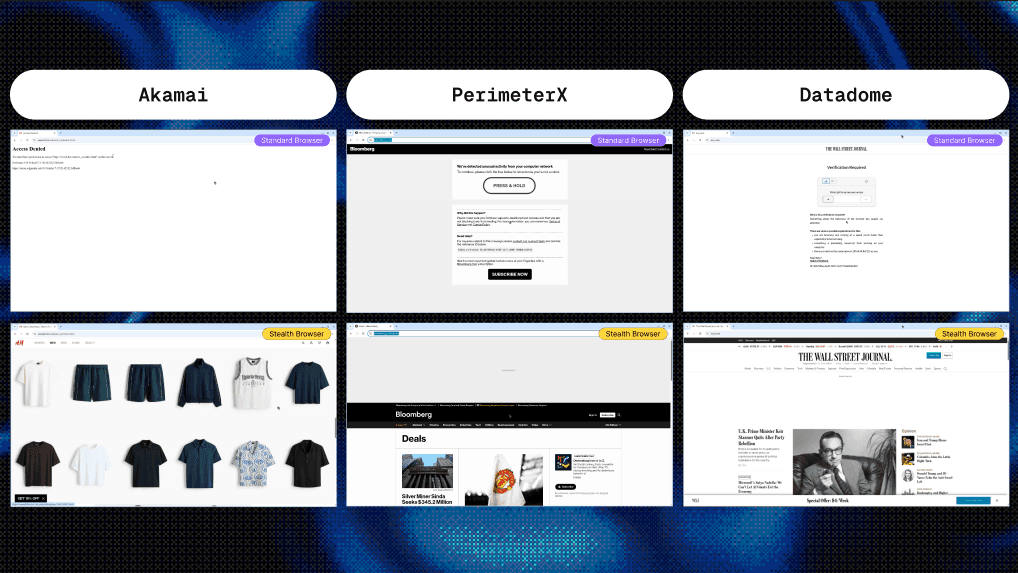
Stealth is usually the first thing that breaks
Most agent work is mundane and authorized. Signing into an account you own, pulling a report from an internal tool, running a workflow a customer asked for.
But the open web can't tell your agent from a malicious bot. So legitimate, user-permissioned agents get challenged and blocked by sites that have no reason to block them.
For a lot of teams, this is the number one blocker. The antibot fires, the workflow stalls, and your use case doesn't matter — you're banned by default.
Our job is to get you past that. We patch the signals that tell a site you're running automation, so your agent looks like a person on a normal browser.
Patching on top got us far, then hit a ceiling
Until today, most of that work was a layer on top of a stock browser. Start Chrome, patch the user agent, add a proxy, inject JavaScript to clean up the obvious fingerprint surfaces.
That unblocks a huge range of common sites. For most jobs, it's enough.
But the heaviest antibot systems still flagged our customers. They read browser-level signals you can't reach from an injected script: GPU and WebGL fingerprints, media devices, OS-level details.
Injected patches are also late. They race the page's own code, miss browser-level surfaces, and leave inconsistencies the challenge can detect. To get past those systems, we had to go lower.
So we forked Chromium
Stealth Browser moves the fingerprint work out of injected JavaScript and into Chromium itself. The browser profile is applied in the browser process, before any page script can read the surfaces that describe it.
GPU and WebGL are the clearest example. Those values come from the browser, so repairing them from a script is already too late. Patch them at the source and they stay consistent from the first request.
Forking also let us strip Chromium down. We cut bloat we don't need, which keeps sessions lighter, and we fixed consistency issues that made long-running sessions flaky.
What you get
A consistent browser state from the first request means fewer false bot signals and fewer challenges. The hardest sites get more reachable, sessions run a bit faster, and long-running jobs fail less often.
Because the evasion happens at the fingerprint level, you often clear antibot systems entirely, with no challenge left to solve.
In addition to antibot evasion, you also get a win and cost win. Captcha solving can take up to two minutes per challenge, and you pay for every browser minute it idles there. Often you'll be able to skip the solving process entirely, saving you time and money.
Request access
Stealth Browser is an enterprise feature, and we're opening access deliberately. New access is gated because it's support-intensive — we want to understand each workload before we enable it.
If you want in, bring us your hardest job.
The fastest way in is to book a call with our founders - join and tell us what's breaking, and we'll get you set up.
This post is Day 1 of Steel Launch Week v3. See the full week at https://steel.dev/launch-week
Launch Week→ Day 01
Today we're shipping Stealth Browser: our own Chromium fork, hardened at the source so user-permissioned agents stop getting blocked by the web's toughest antibot systems.
It's been running in production with a handful of beta customers for a few weeks. Starting today, we're opening it to every enterprise customer at no additional cost.
Stealth is usually the first thing that breaks
Most agent work is mundane and authorized. Signing into an account you own, pulling a report from an internal tool, running a workflow a customer asked for.
But the open web can't tell your agent from a malicious bot. So legitimate, user-permissioned agents get challenged and blocked by sites that have no reason to block them.
For a lot of teams, this is the number one blocker. The antibot fires, the workflow stalls, and your use case doesn't matter — you're banned by default.
Our job is to get you past that. We patch the signals that tell a site you're running automation, so your agent looks like a person on a normal browser.
Patching on top got us far, then hit a ceiling
Until today, most of that work was a layer on top of a stock browser. Start Chrome, patch the user agent, add a proxy, inject JavaScript to clean up the obvious fingerprint surfaces.
That unblocks a huge range of common sites. For most jobs, it's enough.
But the heaviest antibot systems still flagged our customers. They read browser-level signals you can't reach from an injected script: GPU and WebGL fingerprints, media devices, OS-level details.
Injected patches are also late. They race the page's own code, miss browser-level surfaces, and leave inconsistencies the challenge can detect. To get past those systems, we had to go lower.
So we forked Chromium
Stealth Browser moves the fingerprint work out of injected JavaScript and into Chromium itself. The browser profile is applied in the browser process, before any page script can read the surfaces that describe it.
GPU and WebGL are the clearest example. Those values come from the browser, so repairing them from a script is already too late. Patch them at the source and they stay consistent from the first request.
Forking also let us strip Chromium down. We cut bloat we don't need, which keeps sessions lighter, and we fixed consistency issues that made long-running sessions flaky.
What you get
A consistent browser state from the first request means fewer false bot signals and fewer challenges. The hardest sites get more reachable, sessions run a bit faster, and long-running jobs fail less often.
Because the evasion happens at the fingerprint level, you often clear antibot systems entirely, with no challenge left to solve.
In addition to antibot evasion, you also get a win and cost win. Captcha solving can take up to two minutes per challenge, and you pay for every browser minute it idles there. Often you'll be able to skip the solving process entirely, saving you time and money.
Request access
Stealth Browser is an enterprise feature, and we're opening access deliberately. New access is gated because it's support-intensive — we want to understand each workload before we enable it.
If you want in, bring us your hardest job.
The fastest way in is to book a call with our founders - join and tell us what's breaking, and we'll get you set up.
This post is Day 1 of Steel Launch Week v3. See the full week at https://steel.dev/launch-week

All Systems Operational