
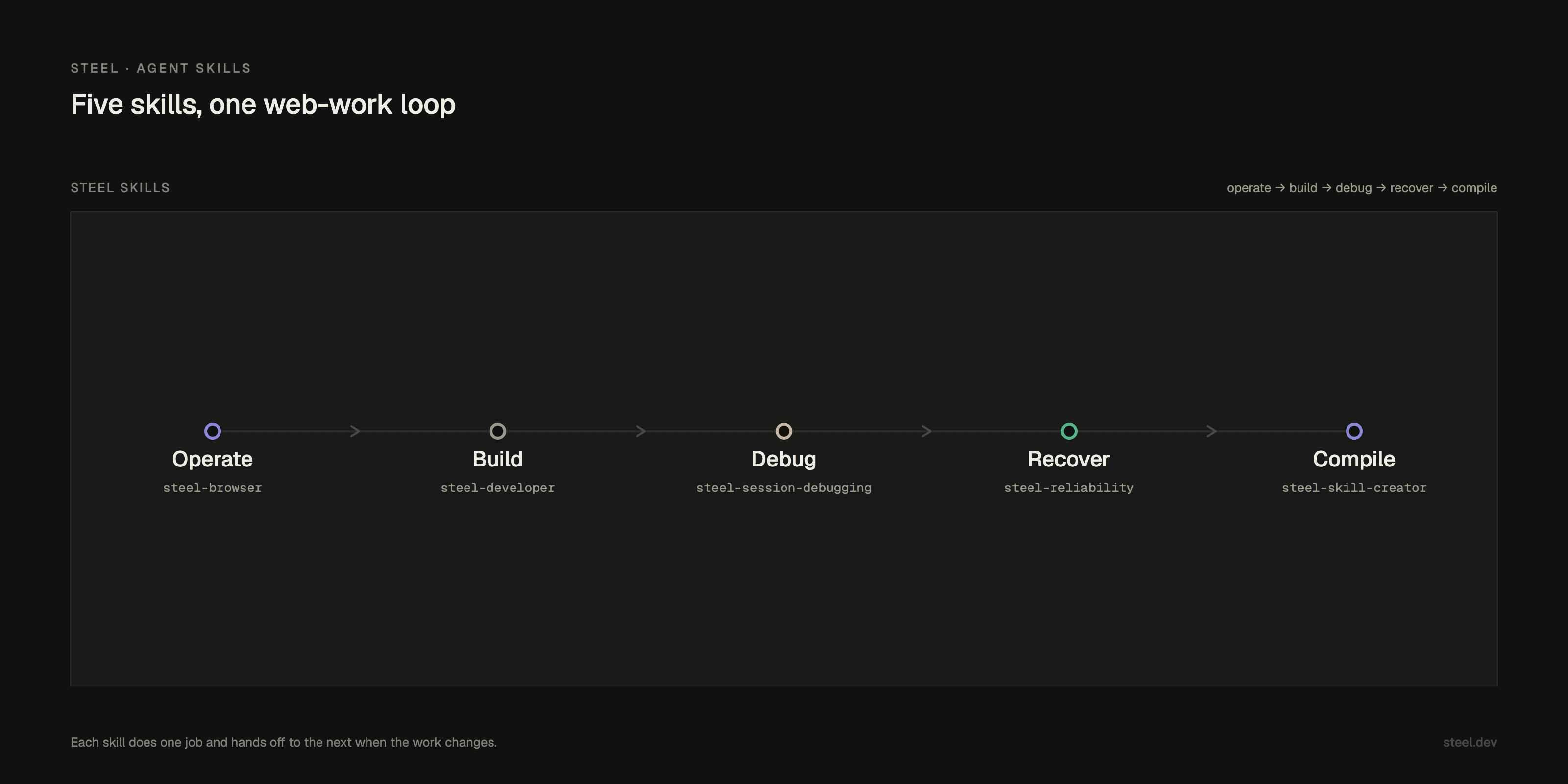
Today we are launching Steel Skills, a catalog of five agent skills for the web.
Today we are launching Steel Skills: five agent skills that give your agent a real browser, plus the judgment to know which one the job needs. Install one, or install the set, in Claude Code, Cursor, Codex, opencode, Pi, or any compatible agent.
We shipped steel-browser first, and one problem kept surfacing. With it loaded, the agent would reach for a browser even when the job was writing SDK code or debugging a failed run. Even after tuning the trigger words. One broad skill fires at the wrong moment and pulls the work sideways.
A single skill is a tool; a set of skills narrow enough to know when not to fire, and when to hand off, is a system.
So we split the work and built the rest.
TL;DR
- 5 skills:
steel-browser,steel-developer,steel-session-debugging,steel-reliability,steel-skill-creator - Install one or the whole catalog by hand, with
npx skills, or as a Claude Code plugin - Each skill does one job and routes to the next when the job changes
Why skills, why now
Agents are getting better at using computers. What still trips them up is the procedure around the task: when to open a browser instead of writing code, when to stop and inspect a failed run, when a block is a login and not a broken selector. The judgment, not the keystrokes.
A prompt tells an agent what you want once. A skill tells it how a job runs every time: when to fire, which tools to use, what to return, where to hand off.
Skills are becoming portable operating procedures for agents.
In short time, skills went from a Claude feature to an open format other agents read. Steel Skills is that, for the web.
Not one giant web skill. Not five unrelated prompts. A small system that moves the way web work moves: operate, build, debug, recover, then compile the path you keep repeating.
A skill is a contract, not a prompt
A SKILL.md says when to act, how to run, what good output looks like, and what to do when it blocks. Less glue to rebuild per project. One path that holds across agents.
Scope was the harder call. A skill that tries to do everything triggers at the wrong moment and helps with none of it, so each of ours does one job. The narrow description is the feature. It's what makes a skill fire when it should.
What we kept coming back to was the handoff. Web work doesn't stay in one mode. You browse, it breaks, you need to know why, then you need it fixed. So steel-browser routes a dead session to steel-session-debugging, which gathers the evidence and hands it to steel-reliability.
We'd rather compile a skill than write one. A Steel Agent Trace already holds the selectors, the wait points, and the input values. steel-skill-creator reads two real runs and writes the skill from what happened in the browser, not from what someone remembered to type.
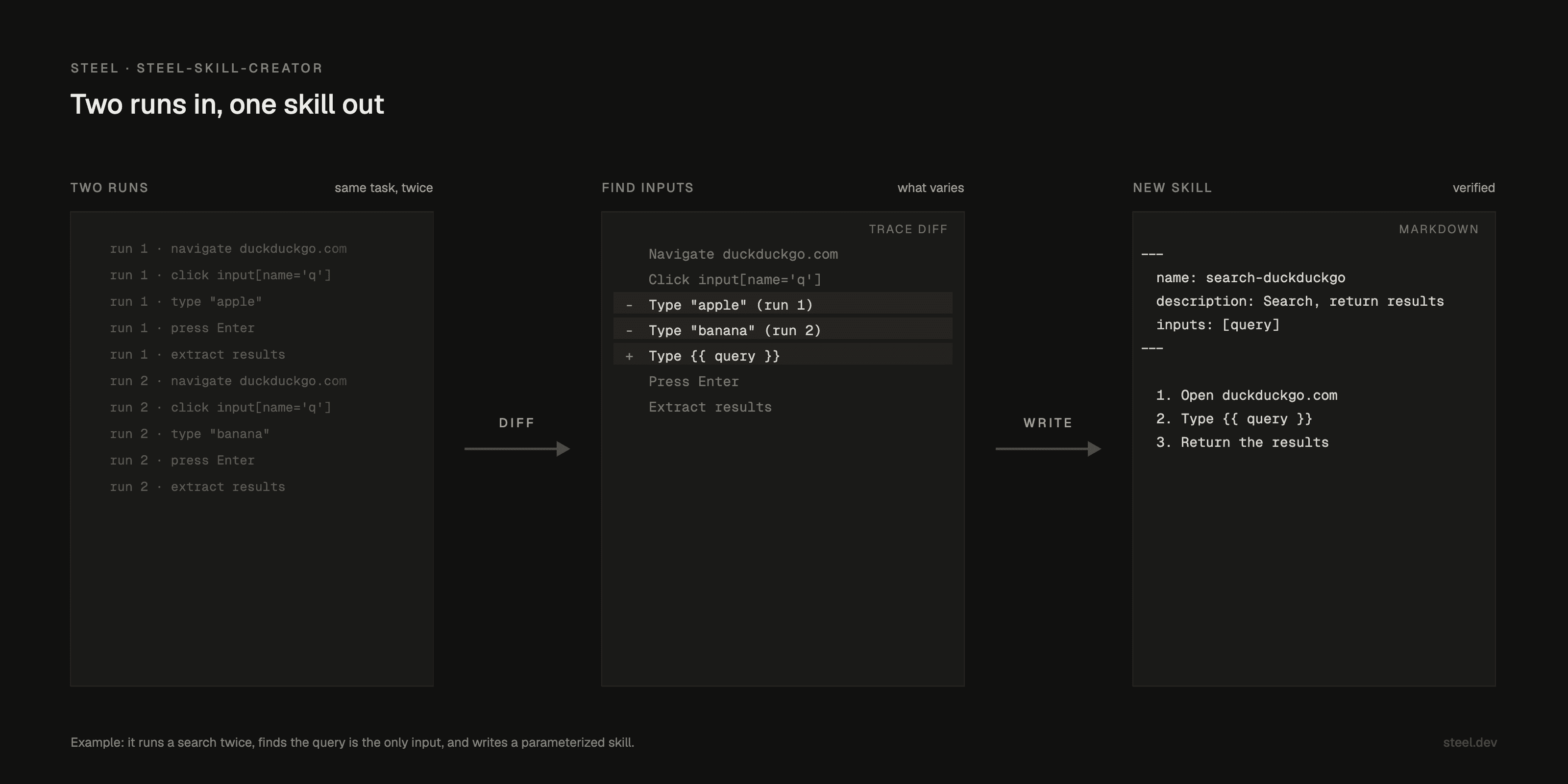
Skills execute real work, so we treat them like operational code: narrow scope, explicit failure modes, clear handoffs, no magic bypass. steel-reliability starts with the cheapest fix and never promises a guaranteed way past bot detection. And the SKILL.md is portable. Write the capability once; it follows you when your tools change.
The five skills
New here? Start with steel-browser and steel-developer. Add the rest when you're running repeated workflows or chasing failed sessions. Less is more with skills, so feel free to optimize.
This was a team build: Jun made steel-browser, Dane wrote steel-developer, Nas owns both steel-session-debugging and steel-reliability, and Niko built steel-skill-creator.
Install
A few ways to install a skill: the Steel CLI, npx skills, the Claude Code marketplace, or by hand.
Every skill drives the Steel CLI, so install and authenticate it once first:
curl -fsS https://setup.steel.dev | sh
steel login
With the Steel CLI. You just installed it, so this is the shortest path:
steel skills list
steel skills install steel-browser
With npx skills. List what is available, then add one:
npx skills add steel-dev/skills --list
npx skills add steel-dev/skills --skill steel-browser
Through the Claude Code marketplace. Add the catalog, then install skills by name:
/plugin marketplace add steel-dev/skills
/plugin install steel-browser@steel-skills
By hand. A skill is just a folder with a SKILL.md, so you can copy it straight into your agent's skills directory:
git clone https://github.com/steel-dev/skills
cp -r skills/steel-browser ~/.claude/skills/
After installing, restart your agent client so it can discover the skill, then verify it loaded:
steel skills doctorWhat we learned
Before we shipped, we spent real time optimizing these skills against evals, and learned how easily a score lies. A skill could return the right-looking answer while running commands that don't exist, and the eval would rank it first. Tuning the wording to win taught it to look good on cases we'd already seen. On held-out tasks, the same skill cleared barely half. What held up was checking the run itself: did the commands work, did the session do what the skill claimed. That's why steel-skill-creator builds from real traces.
Try it
Install one skill. Run one real flow. Then tell us one blocker and one pass in Discord.
Learn from our docs how skills help coding agents to use Steel cloud browsers correctly: https://docs.steel.dev/overview/skills